
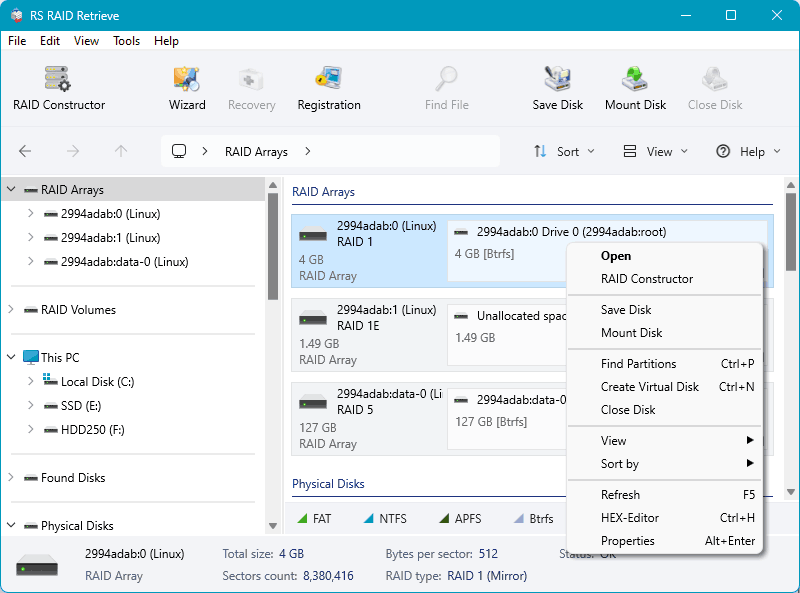

RAID Data Recovery Software
Automatically repair and recover data from failed RAID arrays without the original controller
🔍
Auto-Detection
⚡
No Rebuild
🛡️
100% Safe
💾
All NAS Brands
5min
Auto Detection
15+
File Systems
21+
RAID Types
24/7
Support
Why Choose RS RAID Retrieve?
The most powerful and user-friendly RAID recovery solution for professionals and home users
Automatic RAID Detection
Forget about manual configuration! RS RAID Retrieve automatically scans all connected disks and detects RAID parameters in just 5 minutes. The software identifies array type, disk order, stripe size, and block offset without any user intervention.
✓ Saves hours of manual configuration time
Works Without Original Controller
Dead RAID controller? No problem! Connect your disks directly to any computer and RS RAID Retrieve will reassemble the array. No need for expensive hardware replacement or identical controller models.
✓ Eliminates controller dependency
Degraded Array Recovery
Recover data from RAID 5/6 arrays even with failed drives. Unlike NAS devices that attempt risky rebuilds, RS RAID Retrieve prioritizes data extraction. Partial recovery is possible even beyond fault tolerance threshold.
✓ No risky rebuild processes
Advanced Bad Block Handling
Single bad blocks won't stop your recovery. The software gracefully works around damaged sectors, recovering everything that's still accessible. No data left behind unnecessarily.
✓ Maximizes data recovery success
Universal NAS Support
Works with all major NAS brands: Synology, QNAP, Western Digital, ASUSTOR, Thecus, TerraMaster, Buffalo. Simply remove disks from your NAS and connect them to your computer.
✓ Supports 20+ NAS manufacturers
Cross-Platform File System Support
Unique ability to read 15+ file systems including Windows (NTFS, ReFS, FAT, exFAT), macOS (APFS, HFS+), Linux (Ext2/3/4, XFS, Btrfs, ZFS, ReiserFS), Unix (UFS), and VMware (VMFS).
✓ Most comprehensive FS support available
Recover 500+ File Types from Any Device
Universal file recovery from hard drives, USB drives, memory cards, and more
Documents
Microsoft Office (DOC, DOCX, XLS, XLSX, PPT, PPTX), PDF, TXT, RTF, ODT, Pages
Images & Photos
JPG, PNG, GIF, BMP, TIFF, RAW (CR2, NEF, ARW), PSD, AI, SVG, WEBP
Videos
MP4, AVI, MOV, MKV, WMV, FLV, MPEG, 3GP, WebM, VOB, M4V
Audio Files
MP3, WAV, FLAC, AAC, OGG, M4A, WMA, AIFF, APE, ALAC
Archives
ZIP, RAR, 7Z, TAR, GZ, ISO, DMG, BZ2, XZ, CAB
Emails
PST, OST, EML, MSG, MBOX, DBX, Outlook, Thunderbird
Code & Web
HTML, CSS, JS, PHP, Python, Java, C++, XML, JSON, SQL
Databases
MDB, ACCDB, DBF, SQLite, MySQL dumps, SQL Server backups
Supported RAID Configurations
Recovery from all common and exotic RAID types including composite arrays
RAID 0
Striping without parity
RAID 1
Disk mirroring
RAID 4
Block-level striping with dedicated parity
RAID 5
Block-level striping with distributed parity
RAID 6
Double parity protection
RAID 10
Mirrored stripes (1+0)
RAID 50
Striped RAID 5 arrays
RAID 60
Striped RAID 6 arrays
RAID 1E
Enhanced mirroring
RAID 5E
RAID 5 with hot spare
RAID 5EE
Enhanced RAID 5E
X-RAID
Netgear Automatic volume expansion
JBOD
Just a Bunch of Disks
Comprehensive Feature Set
Everything you need for professional RAID data recovery
Virtual Machine Support
Recover data from VMware (VMDK), VirtualBox (VDI), Hyper-V (VHD/VHDX), QEMU/KVM (QCOW2), and Parallels (HDD) virtual disk formats.
View VM Recovery GuidesLinux mdadm Recovery
Full support for Linux software RAID created with mdadm. Automatically detects configuration and metadata format.
Windows Storage Spaces
Recovers data from Windows dynamic disks and Storage Spaces, including parity and mirror spaces.
Manual Configuration Mode
Advanced users can manually specify RAID parameters for exotic configurations or when automatic detection needs assistance.
Disk Image Creation
Create sector-by-sector disk images for safe recovery operations without risking original data.
Read-Only Operation
All recovery operations are read-only. Your original disks remain unchanged, ensuring maximum data safety.
Network Export
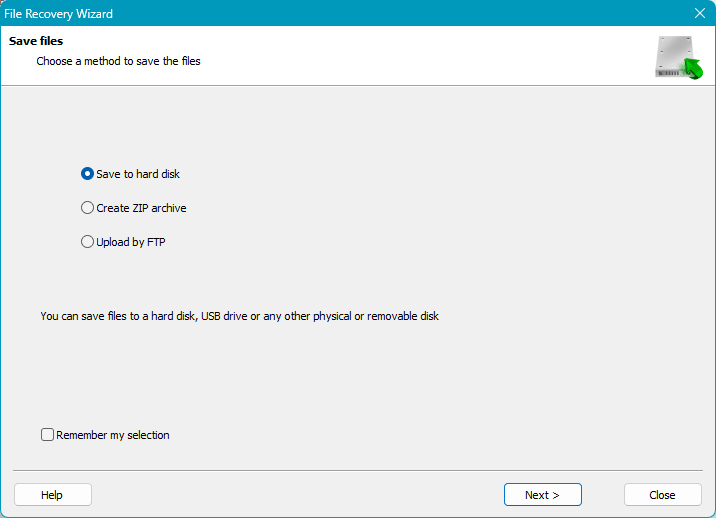
Save recovered files directly to network locations including FTP servers and network shares.
Deep Scan Mode
When quick scan isn't enough, deep scan performs thorough analysis to find all recoverable files.
File Preview
Preview documents, images, videos, and other files before purchasing to verify recovery quality.
VMware vSphere
Hyper-V
VirtualBox
QEMU/KVM
VMFS 5/6
Parallels
XenServer
Proxmox
VMDK Recovery
VMware virtual disks. Thick/thin provisioned. ESXi datastores. Extract files from VMDK without vSphere.
VHD/VHDX Recovery
Hyper-V virtual hard disks. Fixed and dynamic types. Recover from corrupted Hyper-V VMs.
VDI Format
VirtualBox disk images. All allocation types supported. Direct VDI file access.
QCOW2
KVM/QEMU images. Copy-on-write format with snapshots. Linux virtualization support.
VM Snapshot Recovery
Recover from snapshot files and delta disks directly. Broken snapshot chain reconstruction.
VMFS Datastore
VMware VMFS 5/6 support. Multi-extent volumes. Direct datastore access without ESXi.
Comprehensive System Support
Works with all major operating systems and file systems
🪟 Windows File Systems
🍎 macOS File Systems
- APFS (Apple File System)
- HFS+ (Mac OS Extended)
- HFS (legacy)
🐧 Linux File Systems
🖥️ Operating Systems
- Windows 7-11
- Windows Server 2003-2019
- macOS 10.12 - 15 Sequoia
- Ubuntu, Debian, Fedora
- Linux Mint, openSUSE
💽 RAID Controllers
- HP Smart Array
- Dell PERC
- Adaptec
- Intel RSTe
- LSI MegaRAID
- DDF-compatible devices
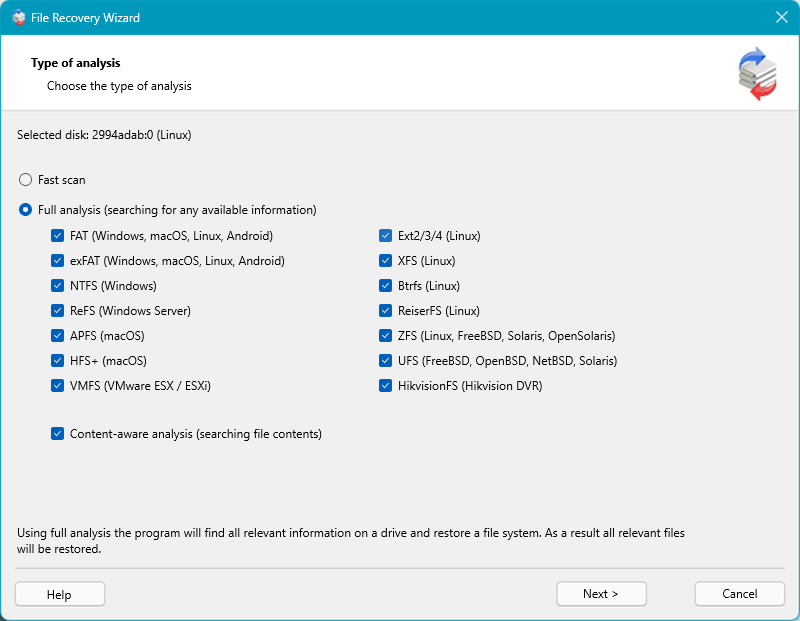
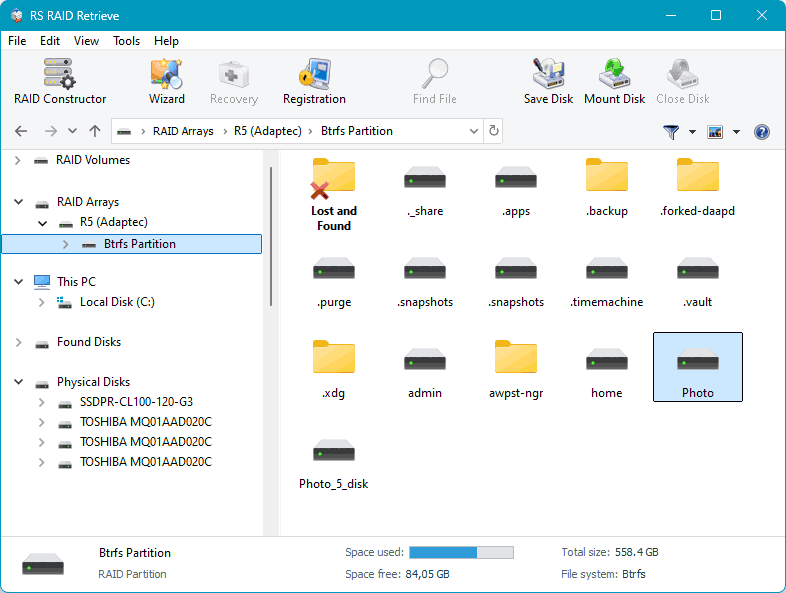
How RAID Recovery Works
Simple Steps Process for Automatic RAID Detection & Reconstruction
Free vs Full Edition: RAID Data Recovery Features
See what features are included in the Free Edition and what’s unlocked in the Full Licensed Version.
| Feature | Free Edition | Paid Edition |
|---|---|---|
| Automatic RAID detection | ✓ | ✓ |
| Works without controller | ✓ | ✓ |
| 15+ file systems support | ✓ | ✓ |
| Virtual machine formats (VMDK, VHD, etc.) | ✓ | ✓ |
| NAS support (Synology, QNAP, etc.) | ✓ | ✓ |
| Linux mdadm recovery | ✓ | ✓ |
| macOS, Windows, Linux versions | ✓ | ✓ |
| Bad block handling | ✓ | ✓ |
| Free preview mode | ✓ | ✓ |
| Degraded array recovery | ✓ | ✓ |
| Save files | ✗ | ✓ |
RS RAID Retrieve
Start Your RAID Recovery Now
Download free trial and preview your recoverable files
✓ 30-day money-back guarantee | ✓ Secure payment | ✓ 24/7 support
Compatible with all major NAS manufacturers
Synology
QNAP
Western Digital
ASUSTOR
Thecus
TerraMaster
Buffalo
Netgear
Lenovo
Seagate
Resources & Recovery Guides
Learn how to recover data from different RAID types, file systems, and storage devices
RAID Recovery Guides
Step-by-step tutorials for recovering data from various RAID configurations
NAS Recovery
Recover data from popular NAS devices including Synology, QNAP, and Western Digital
- Netgear ReadyNAS Data Recovery
- Synology NAS Data Recovery
- OpenMediaVault NAS Recovery Guide
- WD My Cloud Recovery
Virtual Machine Recovery
Recover data from VMware, Hyper-V, VirtualBox and other virtualization platforms
View All VM GuidesFile System Recovery
Understanding and recovering data from different file systems across platforms
Advanced Topics
In-depth articles on RAID configurations, storage technologies, and recovery techniques
How-to Guides
Practical tutorials and best practices for data recovery and RAID management
When to Use RS RAID Retrieve
Professional RAID recovery solution for these critical situations
1
RAID Controller Failure
When your hardware RAID controller dies, becomes unavailable, or needs replacement. Use RS RAID Retrieve to bypass the failed controller and access data directly from disks.
✓ Works without original controller
Connect disks to any PC and recover data
2
NAS Device Won't Boot
When your Synology, QNAP, Western Digital, or other NAS device fails to start, won't boot, or has corrupted firmware. Extract data without repairing the NAS unit.
✓ Supports all major NAS brands
SHR, X-RAID, and standard configurations
3
Multiple Drive Failures
When RAID fault tolerance is exceeded (2+ failed drives in RAID 5, 3+ in RAID 6). Attempt partial data recovery from remaining healthy drives when rebuild is impossible.
✓ Advanced mathematical recovery
Extracts data beyond fault tolerance limits
4
Accidental Array Deletion
When RAID configuration is accidentally deleted, reformatted, or reinitialized. Recover data even after the array structure has been removed or overwritten.
✓ Deep RAID structure detection
Reconstructs lost array parameters
5
Corrupted Virtual Datastores
When VMware, Hyper-V, or other virtualization platforms experience datastore corruption. Recover VMDK, VHD, VHDX files directly from underlying RAID arrays.
✓ Direct VMFS/VHDX access
No need for working hypervisor
6
Degraded Arrays with Bad Sectors
When drives develop bad blocks causing rebuild failures. Use when traditional RAID rebuild repeatedly fails or causes more damage to already degraded arrays.
✓ Graceful bad block handling
Skips damaged sectors, recovers the rest
7
Unknown RAID Parameters
When you don't know the RAID configuration details - type, disk order, stripe size, or rotation. Useful for inherited servers or systems without documentation.
✓ Automatic parameter detection
Identifies all settings in ~5 minutes
8
Failed RAID Rebuild
When RAID rebuild fails due to power outage, timeout, or additional disk failure during rebuild. Recover current data state without risky rebuild attempts.
✓ Bypasses rebuild process
Direct data extraction from current state
9
Mixed Disk Sizes in Array
When working with Synology SHR or other flexible RAID configurations that use different disk sizes. Standard tools often fail with non-uniform arrays.
✓ Flexible array support
Handles SHR, SHR-2, X-RAID configurations
10
Cross-Platform RAID Arrays
When recovering from Linux mdadm, Windows Storage Spaces, or ZFS RAIDZ arrays. Use when you need cross-platform file system support (Btrfs, ZFS, XFS, ext4, NTFS).
✓ 15+ file systems supported
Windows, Linux, macOS, Unix, VMware
11
Before Expensive Data Recovery Services
As a first step before sending drives to professional recovery services. Save thousands of dollars by attempting software recovery first on logical failures.
✓ Read-only operations
Safe to try - won't damage drives further
12
Enterprise Server Migrations
When migrating data from old RAID servers to new hardware. Access and copy data without needing to rebuild arrays on incompatible new controllers.
✓ Controller-independent recovery
Works with HP, Dell, Adaptec, LSI controllers
What's New?
19 May 2026
- New Features:
- Added support for remote disk access over SSH on Windows, macOS, and Linux.
- Added support for forensic disk images, including EnCase E01/Ex01, Advanced Forensic Format (*.aff, *.afm), AFF directory images (*.afd), and AFF4 images formats.
- Added support for mounting and analyzing additional disk image formats, including Apple DMG (*.asif, *.sparseimage, *.sparsebundle), sparse images, and DriveImage XML images.
- Added APFS snapshot, ZFS snapshot and ZVOL support.
- Added support for Infortrend SAN devices with automatic RAID detection, RAID reconstruction, snapshot support, and Thick/Thin volume support.
- macOS and Linux: added support for advanced ZIP archive options, including multiple compression methods, password protection, and split archives.
- Windows: added preview support for WinRAR 5 archives.
- Linux: added video and audio preview support and expanded image preview compatibility.
- Improvements:
- Improved APFS quick scan performance.
- Expanded file system compatibility and compression support for Btrfs, NTFS, HFS, and ZFS.
- Improved NTFS log analysis algorithms.
- Improved handling of large ExtX volumes.
- Improved support for compressed and compact files across supported operating systems.
- Bug Fixes:
- Fixed SMART information detection for some NVMe drives in Windows.
- Fixed issues when reading large fragmented HFS files.
- Fixed reading issues with some LVM Thin volume configurations.
- Fixed crashes during preview of certain video files on macOS.
- Fixed occasional freezes during file size calculation and saving operations.
- Various minor bug fixes and stability improvements.
Frequently Asked Questions
Yes! RS RAID Retrieve works without the original controller. Simply connect your drives directly to your PC.
Our software successfully recovers data in 85-95% of cases, depending on the type of failure and number of damaged disks.
Detection: 5-10 minutes | Scanning: 1-4 hours (depends on drive size) | Recovery: 30 minutes - 2 hours.
Yes! RS RAID Retrieve operates in read-only mode and never writes to your original drives, ensuring 100% data safety.
RAID 5 can tolerate 1 drive failure. With 2 failed drives, RS RAID Retrieve attempts partial recovery using advanced algorithms.
No! The trial version lets you preview ALL recoverable files. Only pay if you see your data.
If recovery fails, get a full refund.
Yes! Remove drives from your Synology, QNAP, or other NAS, connect them to PC, and RS RAID Retrieve will detect the configuration.
