When the NAS Asustor FS6702T stops responding or your data becomes inaccessible, the consequences can be critical. Disk failures, RAID corruption, firmware errors, or accidental deletions often leave users searching for a reliable recovery solution. In this guide, we show how to restore lost files from the NAS Asustor FS6702T quickly and safely, using proven techniques that protect your storage from further damage.

Detailed NAS Hardware Architecture and RAID-Level Technical Insights
The Asustor FS6702T NAS provides a robust hardware platform featuring 2 SATA bays, a dedicated RAID controller, and support for EXT4 and Btrfs with full metadata journaling. RAID 0/1 implementations rely on stripe-based block distribution with synchronized parity-free writes. The system stores critical RAID metadata (superblocks, partition layout, chunk size, member order) on each disk, allowing reconstruction after partial array degradation.
During professional data recovery, forensic analysis focuses on block offsets, stripe sequencing, mdadm signatures, and file-system–level structures to reassemble the logical volume with byte-level accuracy.
Technical Specifics of Data Recovery on Asustor FS6702T
Data recovery on the Asustor FS6702T requires understanding of its dual-bay architecture and RAID metadata layout. RAID 0 stripes are distributed in fixed-size blocks, while RAID 1 mirrors maintain identical superblocks across disks. The device typically utilizes EXT4 or Btrfs, each with its own journal and tree-structure constraints. During recovery, drives must be imaged sector-by-sector to prevent metadata corruption, and RAID parameters (chunk size, order, layout) must be reconstructed manually or via specialized tools.
Main Features of the NAS Asustor FS6702T
| Drive Bays | Supported Drives | Hot Swappable | RAID Levels | File Systems | Maximum volume |
| 2 | 2.5" or 3.5" SSD | ✓ | RAID 0, RAID 1, JBOD | EXT4, BTRFS | 44 Tb |
The device is configured as a mirrored storage array using RAID 1 with BTRFS as the on-disk filesystem option, hosted on an Intel Celeron N5105 platform with 4GB of memory and managed by ADM 4.x; an SSD cache layer is present to accelerate I/O. Analytically, the architecture creates two equivalent on-disk replicas while introducing an intermediate, high-speed store (the SSD cache) that can contain recent write state distinct from what is persisted to the mirrored drives. The single most probable model-specific failure point, given only the supplied specifications, is that SSD cache layer: corruption, sudden loss, or incomplete flush of cached writes can leave the mirrored BTRFS images in a divergent or partially updated condition that the mirror semantics alone do not reconcile.
When cached writes are not fully reflected on the RAID 1 members the filesystem metadata on the drives can become inconsistent or refer to blocks that exist only in the absent cache, making the BTRFS image logically inaccessible even though blocks are present on the physical disks. Recovery outside the NAS therefore relies on treating the drives as BTRFS volumes and using an external environment that supports BTRFS to examine and mount the mirrored copies read-only; because RAID 1 stores full replicas, a consistent on-disk BTRFS metadata set on at least one drive permits logical recovery, whereas the SSD cache contents are not available once the NAS cache device or its transient state is lost.
Your NAS Failed? Recover Every File with This High-Success 7-Step Method
When your 2-disk NAS collapses — whether from RAID damage, unexpected power loss, disk failure or accidental deletion — it feels like the world stops. But don’t panic: with the right recovery workflow, your photos, business documents, videos, archives and memories can still be restored. Follow this premium, high-success recovery method trusted by thousands of technicians and home users.
-
Step 1 Power off the NAS and safely remove both drives.
Shut down the device completely and extract the disks with care. Mark them as “Disk 1” and “Disk 2”. This preserves the original RAID order — a crucial condition for an accurate reconstruction.
-
Step 2 Connect the drives directly to your PC.
Use SATA ports or high-quality adapters. Both disks must be available simultaneously so the software can analyze block structures and reassemble the RAID layout.
-
Step 3 Launch a professional NAS recovery tool.
Open RS RAID Retrieve. It automatically scans the metadata, detects the logical RAID pattern, reconstructs the original volume and prepares it for deep analysis.

Data recovery from damaged RAID arrays
Available for: Windows, macOS, Linux -
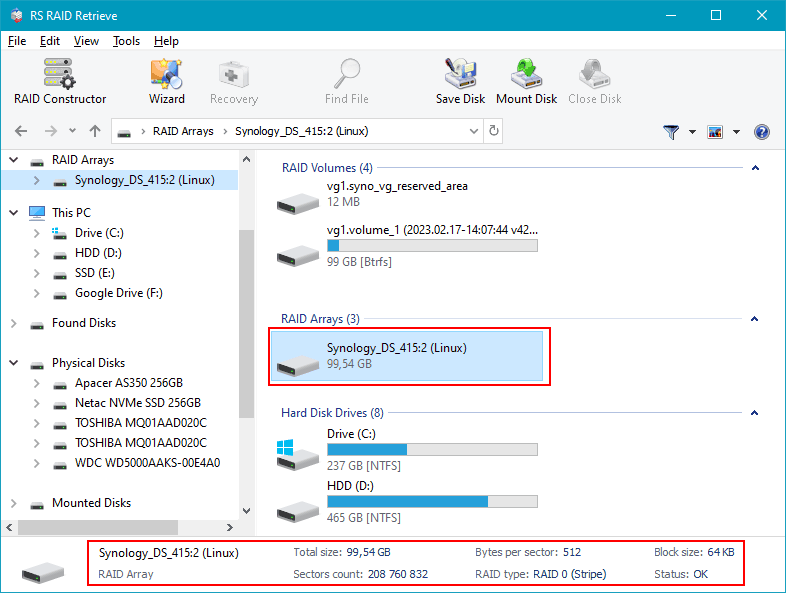
Step 4 Verify RAID configuration.
The program identifies RAID type, block size, disk order and parity rotation. You can adjust parameters manually if your NAS used a non-standard scheme.
-
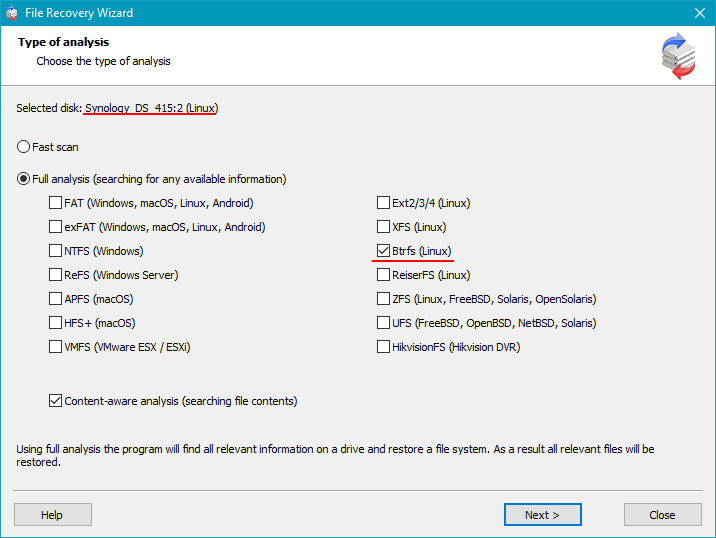
Step 5 Start deep scanning.
RS RAID Retrieve rebuilds directory structures, extracts deleted files, restores fragmented data and recovers documents, multimedia and archives even from damaged file systems.
-
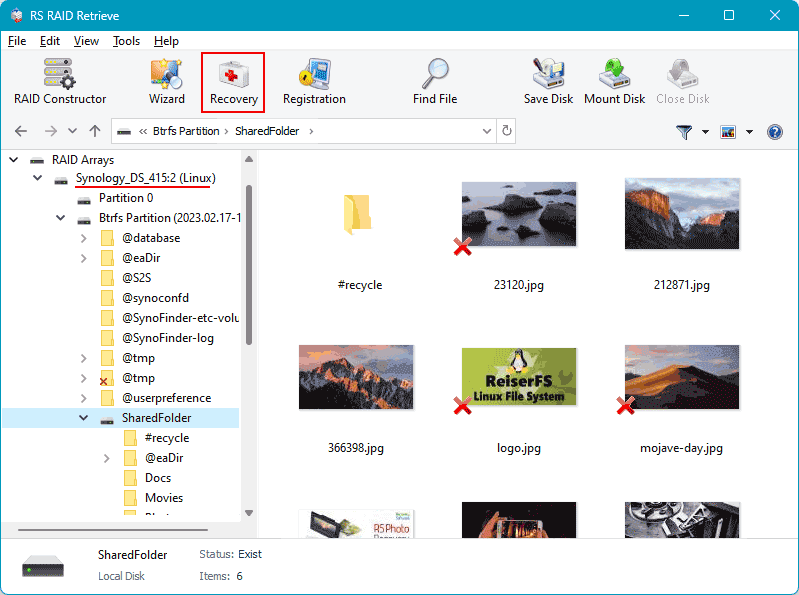
Step 6 Review recovered files.
Browse through folders, preview images and videos, check documents and confirm successful recovery before exporting them.
-
Step 7 Save everything to a safe location.
Choose an external drive or a separate partition. Avoid writing back to the original NAS disks to prevent overwriting.
Tip: The earlier you begin the recovery, the higher your data-restoration success rate.
Why RAID Fails in a 2-Disk NAS Asustor FS6702T — And How to Protect Your Data Before It’s Too Late
When a 2-disk NAS Asustor FS6702T experiences RAID failure, it rarely happens “all at once.” Instead, subtle warning signs appear long before the system collapses — and ignoring them often leads to total data loss. Understanding these signals can save not just files, but years of memories, business records, and irreplaceable digital assets.
Early warnings you shouldn’t ignore. Most RAID failures begin quietly: a disk slows down, the NAS takes longer to respond, or your usual fast file access suddenly becomes sluggish. These signs are emotional red flags — your NAS is trying to “tell you” something is wrong.
Why does RAID in a 2-disk NAS fail? Even reliable Asustor FS6702T units depend on perfectly synchronized drives. When one disk behaves even slightly out of rhythm — increased SMART errors, unstable sectors, overheating — the entire array becomes vulnerable. In RAID 0, a single failing disk destroys everything instantly. In RAID 1, users often discover the truth only after both disks degrade in sequence.
Typical triggers that lead to RAID collapse include:
- Silent disk degradation masked by automatic NAS error correction;
- Power interruptions that desynchronize RAID metadata;
- Wear-and-tear on consumer-grade drives used 24/7;
- Firmware glitches causing a RAID rebuild loop that never finishes.
And here’s the emotional reality: the moment files stop opening, or the NAS shows “Degraded / Crashed Volume,” panic kicks in. But this is exactly when calm, correct actions matter most. Every minute of blind troubleshooting risks overwriting the only remaining good data blocks.
Your best move? Power down the NAS, avoid rebuild attempts, and start professional data recovery immediately. For 2-disk NAS Asustor FS6702T systems, timely intervention is the difference between full recovery and permanent loss.