Hardware and Performance Characteristics of NAS WD My Cloud Home Duo
The WD My Cloud Home Duo uses a dual-bay setup supporting RAID 0 and RAID 1, typical for small offices or home use. Its processor and memory handle normal multi-user workloads without issue, but performance drops during extended rebuilds or heavy backup periods. It runs on EXT4 or Btrfs filesystems, each bringing its own recovery quirks—Btrfs’s copy-on-write and snapshot mechanisms, for instance, complicate data recovery when metadata is damaged or incomplete.
In practical recovery work, pinpointing RAID parameters like chunk size and layout is crucial; getting these wrong often results in partial or failed restores. Sudden power outages or degraded arrays tend to cause filesystem inconsistencies that make recovery tougher, especially if RAID metadata is corrupted or missing. The device’s caching and write ordering behavior also impacts how missing data blocks are pieced back together, so a detailed assessment of both RAID and filesystem conditions is necessary before starting restoration.
Technical Aspects of Data Recovery on WD My Cloud Home Duo
The WD My Cloud Home Duo relies on dual-disk RAID setups, typically RAID 0 (striping) or RAID 1 (mirroring). Recovery usually depends on piecing together key metadata from EXT4 or Btrfs filesystems, interpreting RAID parameters stored on the devices, and reconstructing the logical-to-physical block mapping. RAID 0 is the toughest since losing any disk means losing all data, whereas RAID 1 can sometimes be salvaged if one drive is still accessible. More complicated recoveries often involve corrupted partition tables, damaged DSM filesystem structures, or both drives showing as “crashed,” which calls for low-level forensic work to retrieve any usable data.
Main Features of the NAS WD My Cloud Home Duo
| Drive Bays | Supported Drives | Hot Swappable | RAID Levels | File Systems | Maximum volume |
| 2 | 2.5" or 3.5" HDD | ✗ | RAID 1 | EXT4 | 20 Tb |
The storage arrangement is a mirrored volume implemented as RAID 1 with an EXT4 filesystem, managed by an Android-based OS running on a Realtek RTD1295 platform with 1GB DDR4 of memory and SSD cache: No. Because the design depends on mirror coherence rather than cache buffering, the critical, model-specific failure point is the OS-level metadata and mirror management on the Realtek/1GB platform: constrained memory and the Android-based control stack can allow EXT4 metadata or RAID mirror state to diverge or become inconsistent during abnormal operation, leaving the logical volume malformed even though physical blocks persist.
When the EXT4 namespace or mirror state is inconsistent, the system cannot present a coherent filesystem view and files become logically inaccessible despite data still being present at block level. Recovery outside the NAS therefore follows a single principle: treat the mirrored members as EXT4 images and perform offline metadata examination, repair, or selective extraction on an external system that understands EXT4 and can reconcile or rebuild a consistent RAID 1 view independent of the device’s Android-based controller.
Practical Steps to Recover Data from a Two-Disk NAS
When a two-disk NAS like the WD My Cloud Home Duo fails suddenly—whether due to lost RAID configuration or inaccessibility—there’s usually a way to get your data back. This guide covers the recovery process with a focus on hands-on troubleshooting, even if you’re new to RAID issues.
-
Step 1 Power down the NAS and remove both drives carefully.
Make sure the device is completely off to avoid further damage. Remove both disks, keeping track of their original slots—Disk 1 and Disk 2—as the RAID setup depends on correct disk order.
-
Step 2 Connect the drives to a workstation at the same time.
Use SATA ports or USB-to-SATA adapters, but both disks must be connected simultaneously. Recovery tools need access to the full RAID set to locate metadata and reconstruct the array.
-
Step 3 Launch RAID recovery software.
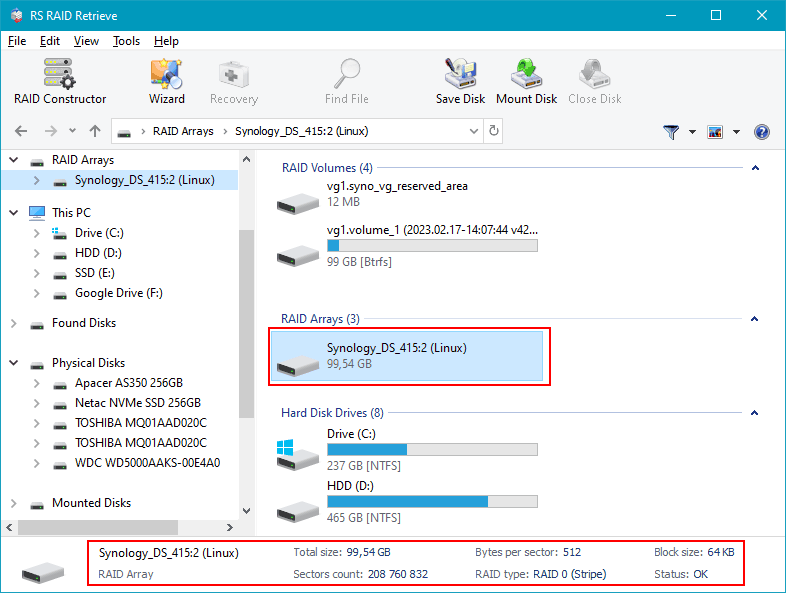
Start RS RAID Retrieve and run a scan. The program searches for RAID metadata remnants and shows the detected RAID layout in the bottom panel, giving a snapshot of the current RAID state.

Data recovery from damaged RAID arrays
Available for: Windows, macOS, Linux -
Step 4 Check and adjust RAID parameters if necessary.
Usually, RAID 0 or RAID 1 is detected automatically. If the array seems off, switch to manual mode to adjust block size, disk order, or other settings to match the original configuration.
-
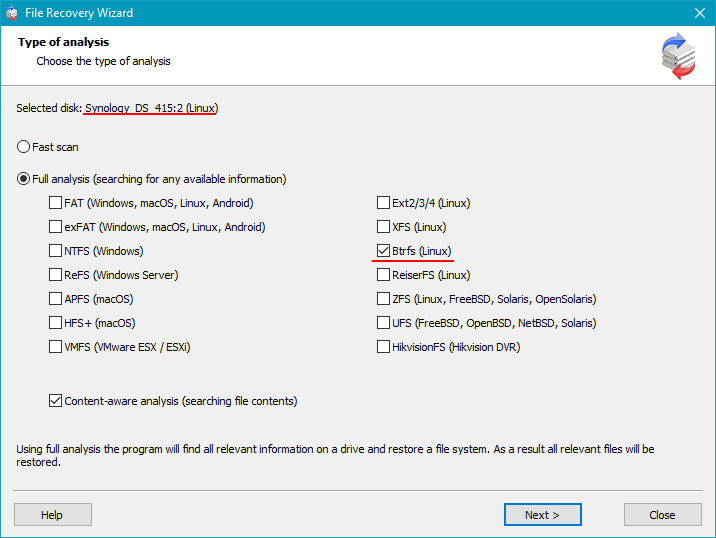
Step 5 Run a deep scan.
This scan rebuilds folder structures, recovers deleted files, and searches disk sectors for fragmented or lost data—essential when metadata or filesystem info is damaged.
-
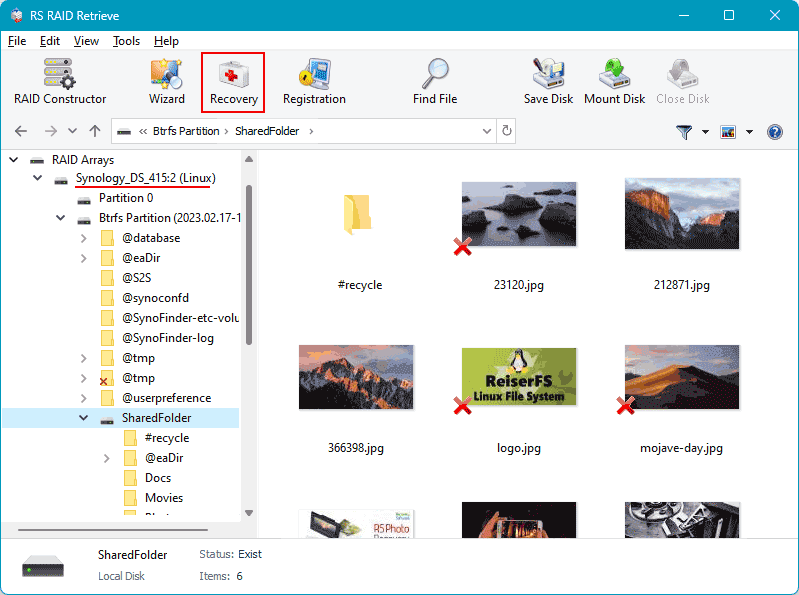
Step 6 Inspect the recovered directory tree.
The scan results display a folder tree similar to a file explorer. Use this to confirm critical files like photos, documents, or backups are intact before moving on.
-
Step 7 Export recovered data to a separate drive.
Save recovered files to a different disk or external storage. Writing back to the original NAS drives risks overwriting recoverable data and complicates further recovery efforts.
Note: For NAS devices using EXT4 or Btrfs filesystems, running a deep scan is especially useful—it boosts recovery chances by reconstructing damaged or partially corrupted directory structures.
Why RAID Fails in 2-Bay NAS WD My Cloud Home Duo: Key Causes You Shouldn’t Ignore
When a 2-bay NAS WD My Cloud Home Duo starts acting up, it’s often too late to prevent RAID array damage. Understanding what causes RAID failure is essential to act before data becomes unreachable or lost. Despite their design for reliability, these units still face issues from drive wear, firmware bugs, or overlooked warning signs.
Uneven disk wear is a common problem. In dual-drive setups, both disks run continuously for years, developing bad sectors or slow I/O areas that gradually degrade the array. Firmware RAID management adds complexity: small glitches, unpatched bugs, or interrupted syncs can quietly corrupt RAID metadata and eventually cause the array to fail without clear symptoms.
Environmental factors play a bigger role than many expect. Heat buildup, unstable power, or vibrations speed up drive wear and cause intermittent read errors that show up later as RAID failures. By the time users notice odd noises, slowdowns, or file errors, the damage is usually advanced. This makes quick diagnostics and following proper recovery steps critical.
- Disk desynchronization and reconstruction errors often occur after sudden power loss or forced shutdowns, leaving the array vulnerable.
- SMART warnings can signal physical issues like head crashes or platter damage early on, if monitored properly.
- RAID misconfiguration after expansions, resets, or mistaken rebuilds can create conflicting metadata that confuses the RAID controller and risks data loss.
Spotting these failure signs early can prevent total RAID collapse on your WD My Cloud Home Duo and improve chances for successful data recovery.