Data loss on the NAS Asustor AS6102T usually occurs due to disk errors, failed RAID rebuilds, or corrupted system partitions. Even a small issue can make the entire storage volume unreachable. In this article, we describe the main failure scenarios for the NAS Asustor AS6102T and provide clear steps for safe data recovery.

NAS Hardware Specifications and RAID Architecture
The Asustor AS6102T NAS is equipped with 2 drive bays, supporting RAID 0/1/5/6 configurations depending on the installed firmware. Its controller manages data distribution across disks to ensure redundancy and optimized throughput. File systems include EXT4 and Btrfs, with the latter providing snapshotting and enhanced data integrity features.
During recovery operations, the RAID metadata, partition tables, and stripe order must be analyzed to rebuild the logical volume correctly.
Internal Factors Affecting Data Recovery on Asustor AS6102T
Recovering data from the Asustor AS6102T delivers clear benefits for home users and small businesses. With its two-bay architecture and RAID 0/1 support, data reconstruction becomes predictable and efficient. Modern recovery tools can rebuild damaged arrays, restore deleted files, and retrieve lost multimedia libraries, even after system failures or accidental resets.
Main Features of the Asustor AS6102T NAS
| Drive Bays | Supported Drives | Hot Swappable | Supported RAID | File Systems | Maximum volume |
| 2 | 2.5" or 3.5" SATA | ✓ | RAID 0, RAID 1, JBOD | EXT4 | 20 Tb |
The unit is configured as a mirrored array (RAID 1) using EXT4 volumes managed by ADM 3.x/4.x on hardware identified as Intel Celeron N3050 with 2GB of RAM. In this setup the storage architecture depends on ADM to coordinate mirror resynchronization and on-disk EXT4 journal replay to present a consistent filesystem. The single most probable model-specific failure point is the interaction between the ADM RAID management and the EXT4 metadata under constrained resources: limited memory and modest CPU capability can allow an interrupted resync or ADM service failure to leave the EXT4 journal and ADM RAID metadata inconsistent across mirrors, producing a state the native manager cannot accept.
When that inconsistency exists data becomes logically inaccessible because the system refuses to mount or assemble the array while on-disk metadata disagree; the media themselves remain readable but the combined RAID 1 layout and EXT4 metadata do not present a coherent namespace to the running ADM. Recovery outside the NAS therefore follows a single diagnostic principle: present the disks to an external host that can interpret the RAID 1 layout and EXT4 structures, extract the intact mirror or perform offline metadata/journal repairs, and copy data off before any write-back that could further diverge the mirrors.
Your NAS Failed? Recover Every File with This High-Success 7-Step Method
When your 2-disk NAS collapses — whether from RAID damage, unexpected power loss, disk failure or accidental deletion — it feels like the world stops. But don’t panic: with the right recovery workflow, your photos, business documents, videos, archives and memories can still be restored. Follow this premium, high-success recovery method trusted by thousands of technicians and home users.
-
Step 1 Power off the NAS and safely remove both drives.
Shut down the device completely and extract the disks with care. Mark them as “Disk 1” and “Disk 2”. This preserves the original RAID order — a crucial condition for an accurate reconstruction.
-
Step 2 Connect the drives directly to your PC.
Use SATA ports or high-quality adapters. Both disks must be available simultaneously so the software can analyze block structures and reassemble the RAID layout.
-
Step 3 Launch a professional NAS recovery tool.
Open RS RAID Retrieve. It automatically scans the metadata, detects the logical RAID pattern, reconstructs the original volume and prepares it for deep analysis.

Data recovery from damaged RAID arrays
Available for: Windows, macOS, Linux -
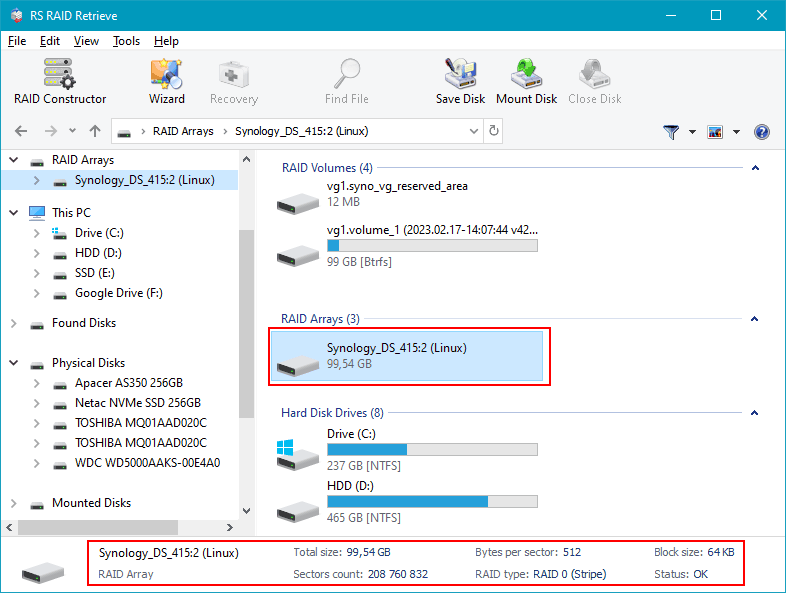
Step 4 Verify RAID configuration.
The program identifies RAID type, block size, disk order and parity rotation. You can adjust parameters manually if your NAS used a non-standard scheme.
-
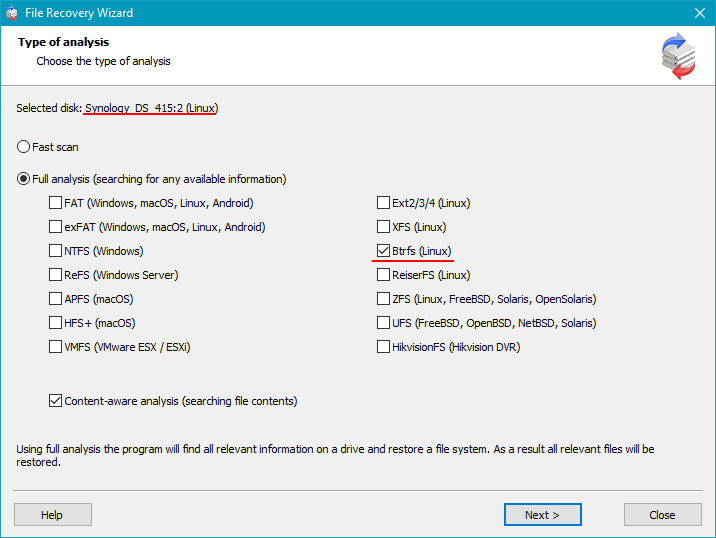
Step 5 Start deep scanning.
RS RAID Retrieve rebuilds directory structures, extracts deleted files, restores fragmented data and recovers documents, multimedia and archives even from damaged file systems.
-
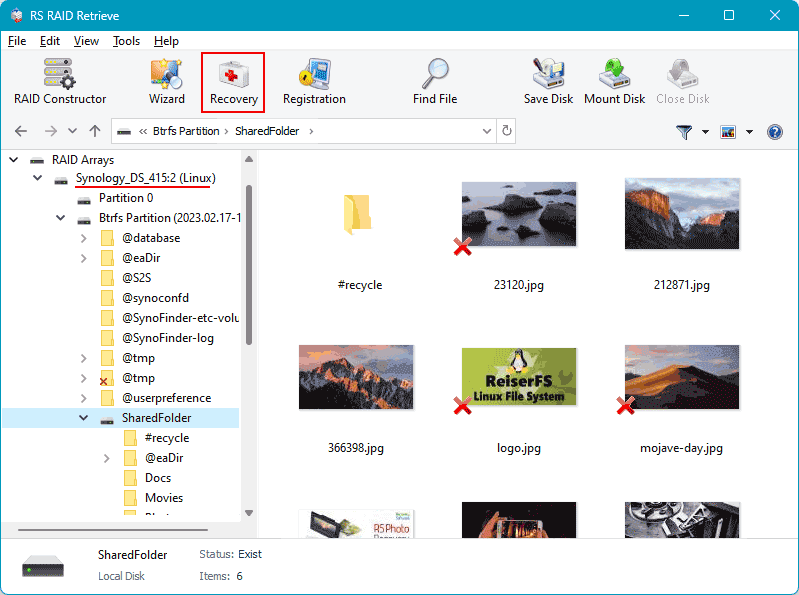
Step 6 Review recovered files.
Browse through folders, preview images and videos, check documents and confirm successful recovery before exporting them.
-
Step 7 Save everything to a safe location.
Choose an external drive or a separate partition. Avoid writing back to the original NAS disks to prevent overwriting.
Tip: The earlier you begin the recovery, the higher your data-restoration success rate.
Why RAID Fails in 2-Disk NAS Asustor AS6102T Systems — Key Causes and Early Warning Signs
RAID failures in 2-disk NAS Asustor AS6102T systems follow a predictable pattern: performance degradation, disk desynchronization, and finally, a complete breakdown of the storage array. Understanding why these failures occur — and how to identify them early — is crucial for users who rely on their NAS for backup, multimedia libraries, work files, or continuous data access.
RAID mechanics and why issues escalate quickly. RAID arrays in small 2-disk NAS units depend on stable disk reads, synchronized metadata, and consistent throughput. When one disk begins showing SMART warnings, unstable sectors, or temperature spikes, the RAID integrity deteriorates. These seemingly minor issues often accelerate until the system becomes “Degraded,” enters a rebuild loop, or loses access to volumes entirely.
Most common SEO-relevant causes of RAID failure:
- Progressive bad sectors leading to inconsistent RAID parity or mirrored data;
- Metadata corruption caused by sudden shutdowns or unstable power environments;
- Non-NAS-rated drives reaching end-of-life after continuous 24/7 operation;
- Firmware conflicts or incomplete RAID rebuilds after a disk replacement.
Why 2-disk systems are especially vulnerable. RAID 0 loses all data if even one disk becomes unreadable. RAID 1 offers redundancy, but if the second disk begins degrading before the first is replaced — a common scenario — the entire array collapses. This risk is heightened in Asustor AS6102T units that run multiple services (file sharing, media servers, virtual environments), adding additional load to drives.
SEO takeaway: Slow file access, degraded RAID status, disappearing disks, or unusual NAS noise should immediately prompt backup or data recovery actions. The faster the response, the greater the chance of full recovery from a 2-disk NAS Asustor AS6102T.
The main causes of data loss in NAS devices
Disk failure. Physical malfunction of HDD or SSD is a common reason for data loss, especially in 2-disk NAS systems affecting RAID0 and important for RAID1.
Human errors (deletion, formatting). Accidental deletion or incorrect formatting can result in inaccessible files, requiring prompt recovery actions.
Firmware or DSM update errors. Improper system updates may corrupt partition tables or file metadata, causing data loss.
Power problems and sudden shutdowns. Unexpected power interruptions during write operations can damage file systems and compromise RAID integrity.