When the NAS QNAP TS-253D stops responding or your data becomes inaccessible, the consequences can be critical. Disk failures, RAID corruption, firmware errors, or accidental deletions often leave users searching for a reliable recovery solution. In this guide, we show how to restore lost files from the NAS QNAP TS-253D quickly and safely, using proven techniques that protect your storage from further damage.

Understanding NAS Hardware and RAID Capabilities
The QNAP TS-253D NAS is equipped with 2 drive bays that can be configured using RAID 0 or RAID 1. RAID 0 spreads data across both disks for higher speed, while RAID 1 mirrors every file to ensure protection against a single-disk failure. Supported file systems — EXT4 and Btrfs — add stability and integrity through journaling and advanced metadata handling.
Understanding these fundamentals helps during data recovery, as each RAID level stores information differently and affects how files can be reconstructed after an incident.
Key Specifics of Data Recovery on QNAP TS-253D
Recovering data from a QNAP TS-253D NAS requires understanding how two-bay systems manage storage. These devices typically support RAID 0 for performance and RAID 1 for redundancy. In RAID 0, losing a single disk causes the entire array to fail, making specialized software essential for reconstruction. In RAID 1, data mirroring increases protection, but corruption of both drives or damage to EXT4/Btrfs file systems still requires connecting disks directly to a computer for recovery.
Two-bay NAS units are frequently used for storing photos, videos, and work archives, so recovery often focuses on personal media and office documents.
Main Features of the QNAP TS-253D NAS
| Drive Bays | Supported Drives | Hot Swappable | Supported RAID | File Systems | Maximum volume |
| 2 | 2.5" or 3.5" SATA | ✓ | RAID 0, RAID 1, JBOD | EXT4, BTRFS, ZFS | 32 Tb |
The TS-253D storage stack is a layered arrangement: physical SATA/SSD devices can be grouped as RAID 0, RAID 1 or JBOD under Linux software RAID (typically mdadm) or deployed as dedicated ZFS pools when ZFS is chosen; filesystems exposed are EXT4, BTRFS or ZFS datasets, with an optional SSD cache layer in front of spinning media. Model-specific failure points for recovery are concentrated at the RAID metadata and cache mapping level, filesystem superblock and metadata trees, and the QTS 4.4 OS stack. Hardware-related symptoms that affect logical integrity include firmware/OS update regressions, kernel or driver faults under the device’s Intel Celeron J4125/4 GB platform that can corrupt on-disk metadata during writes, and power-loss during RAID rebuilds or BTRFS/ZFS scrub operations.
Logical inaccessibility usually manifests when RAID assembly records or filesystem metadata diverge from on-disk content: broken mdadm superblocks, missing array UUIDs, damaged EXT4 superblocks, BTRFS/ZFS metadata tree corruption or inconsistent SSD cache maps. Recovery outside the NAS follows a strict diagnostic principle: work on block-level, read-only images of each disk, assemble arrays on an isolated Linux workstation with native mdadm or ZFS tools (import pools readonly), then perform metadata reconstruction and targeted repairs. Avoid automatic writes on the NAS; prioritize imaging, verification and staged repair on a higher-resourced host to prevent CPU/OS-induced secondary damage.
Step-by-step guide to recover data from NAS QNAP TS-253D
Data recovery from a two-disk NAS (QNAP TS-253D) is possible even in cases of RAID failure, file-system corruption or a complete hardware malfunction. Follow this clear and accessible guide, designed both for beginners and for users discovering NAS recovery procedures for the first time.
-
Step 1 Power off the NAS and remove the drives.
Shut the NAS down completely and carefully remove both disks. Note their original order (Disk 1 / Disk 2), which is essential for correct RAID reconstruction.
-
Step 2 Connect the drives to your computer.
Use internal SATA ports or USB–SATA adapters. Both drives must be connected simultaneously so the software can analyze the RAID metadata.
-
Step 3 Launch the NAS recovery software.
Open RS RAID Retrieve. The program will detect RAID signatures, analyze blocks and reconstruct the original NAS structure.

Data recovery from damaged RAID arrays
Available for: Windows, macOS, Linux -
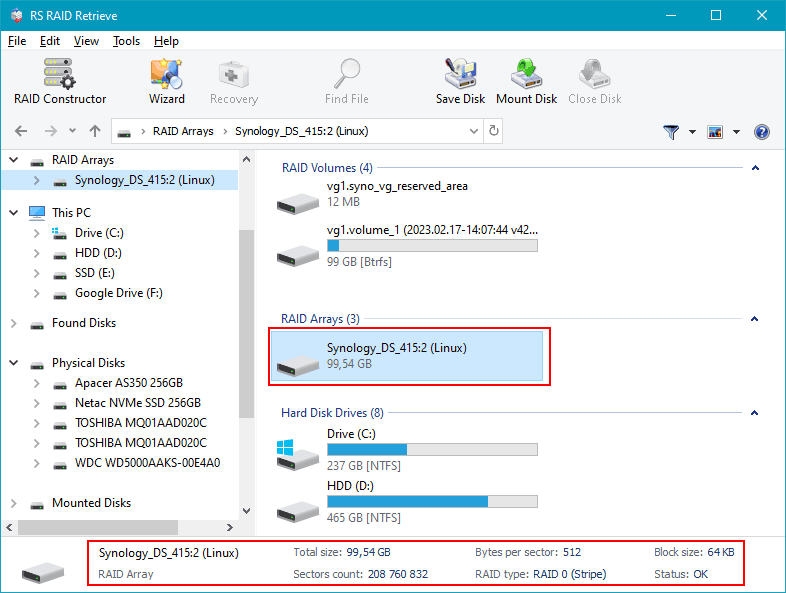
Step 4 Review or manually adjust RAID parameters.
Automatic detection works in most cases, but you can fine-tune the RAID level, block size or disk order if needed.
-
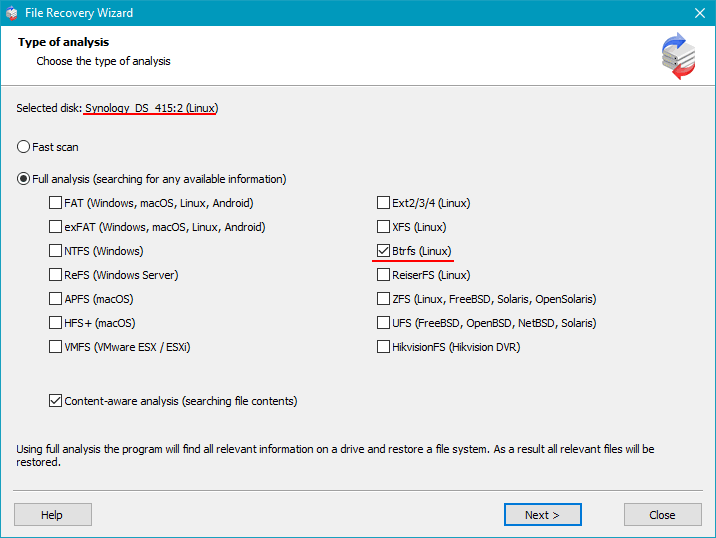
Step 5 Start a deep scan.
Run a full analysis to rebuild the folder tree and recover deleted files, even if fragmented.
-
Step 6 Review the scan results.
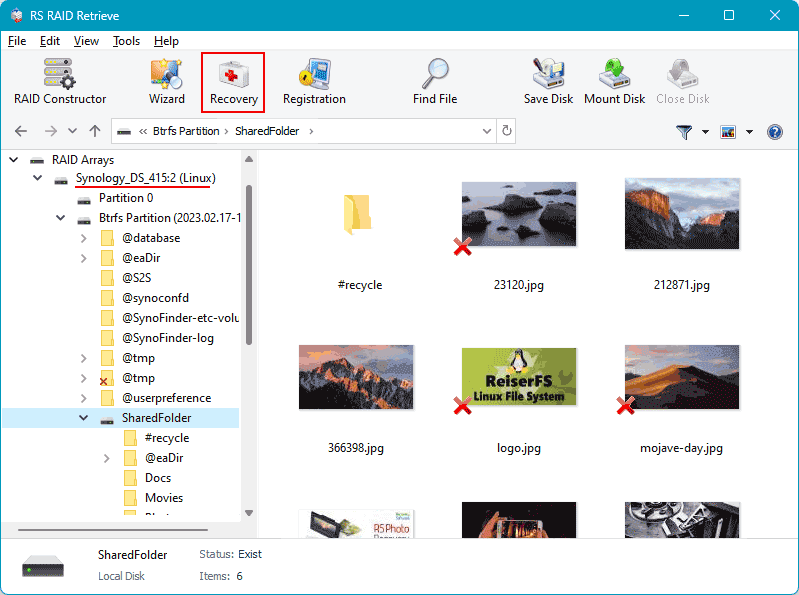
When the analysis completes, the complete NAS structure appears. Check that your documents, photos, videos and archives are accessible.
-
Step 7 Save your recovered data.
Store the files on another disk or an external drive. Never write anything to the original NAS drives.
Tip: Keep the NAS disks in read-only mode to avoid permanent data loss.
Common Causes of Data Loss in NAS Devices
Data loss in NAS systems often occurs due to RAID failures, accidental deletion, firmware corruption, disk degradation, and power outages. Misconfigured RAID arrays or simultaneous disk failures also frequently lead to inaccessible volumes or damaged file structures.
Why RAID Fails in 2-Bay NAS QNAP TS-253D: Key Causes You Shouldn’t Ignore
When a 2-bay NAS QNAP TS-253D begins acting unpredictably, many users discover too late that their RAID array is already compromised. Understanding the real reasons behind RAID failure helps you react before your data becomes inaccessible — or permanently lost. Modern NAS systems are reliable, but even the best devices can fail due to physical wear, configuration issues, or overlooked warning signs.
One of the most common triggers is uneven disk aging. In 2-disk NAS setups, both drives often run continuously for years, accumulating bad sectors or slow read/write areas that gradually push the array into a degraded state. Another critical factor is firmware-based RAID management: a small glitch, unpatched bug, or failed background sync may silently corrupt metadata, eventually leading to RAID collapse.
Environmental stress also plays a surprisingly large role. Overheating, unstable power, or vibration can shorten drive lifespan and create hidden read errors that later manifest as array failure. As soon as users notice unusual noises, unexpected slowdowns, or file access errors, the degradation is usually already in progress. This is why timely diagnostics and proper data recovery procedures are essential.
- Disk desynchronization and reconstruction errors often appear after power outages or forced shutdowns.
- SMART-related warnings signal growing risks of head crashes or platter wear.
- RAID misconfiguration after expansions, resets, or accidental rebuilds frequently results in metadata conflicts.
Recognizing these issues early can protect your NAS QNAP TS-253D from full RAID failure and significantly increase the chances of successful data recovery.