Data recovery on a NAS Asustor AS5402T becomes necessary when the device stops responding, the RAID array degrades, or important files disappear without warning. Usual causes are disk failures, interrupted RAID rebuilds, firmware corruption, or accidental deletions causing logical damage. This overview outlines common failure scenarios on the AS5402T and offers practical recovery methods aimed at preventing further damage while recovering data access.

Technical Specifications of NAS Asustor AS5402T
The Asustor AS5402T NAS comes with 2 drive bays, suitable for home or small office use. It supports RAID 0 and RAID 1 configurations, offering either better performance or data redundancy via mirroring. The device works with EXT4 and Btrfs filesystems, each with different metadata layouts and snapshot features—important factors when recovering from corrupted file tables or rolling back snapshots.
When recovering data from the AS5402T, you need to consider the RAID layout and block order alongside the filesystem type. These details are crucial for rebuilding files after drive failures, interrupted rebuilds, or accidental deletions, especially if RAID metadata or filesystem journals are damaged or incomplete.
Key Specifics of Data Recovery on Asustor AS5402T
Recovering data from an Asustor AS5402T NAS requires understanding how two-bay systems manage storage. These devices usually run RAID 0 for performance or RAID 1 for redundancy. In RAID 0, if one disk fails, the entire array is lost, so you need specialized tools to reconstruct the data. With RAID 1, data is mirrored, but if both drives suffer corruption or the EXT4 or Btrfs file systems get damaged, the drives often have to be removed and connected directly to a workstation for manual recovery.
Since these two-bay NAS units often store personal media like photos and videos along with important work documents, recovery efforts typically focus on retrieving fragmented media libraries and critical office files.
Main Features of the NAS Asustor AS5402T
| Drive Bays | Supported Drives | Hot Swappable | RAID Levels | File Systems | Maximum volume |
| 2 | 2.5" or 3.5" HDD, SSD | ✓ | RAID 0, RAID 1, JBOD | EXT4, BTRFS | 44 Tb |
The unit is operated as a mirrored array (RAID 1) layered by the NAS operating environment, with on‑disk formats selectable between EXT4 and BTRFS. ADM 4.x presents the RAID device to the filesystem and the platform can also employ an SSD cache to accelerate IO. In this layered view the single most probable model‑specific failure point is the SSD cache: as an additional, separate storage tier it introduces a point of state mismatch between cached data and the mirrored devices, which can manifest as filesystem metadata divergence or stale writes under failure conditions.
When the cache layer fails or becomes inconsistent the runtime view presented by ADM and the filesystem drivers can diverge from the persistent state on the RAID 1 members, producing logical inaccessibility even though raw blocks remain intact. Recovery outside the NAS therefore relies on bypassing ADM and the cache and working directly with the persistent filesystems: remove the RAID members and mount them on an external host that supports EXT4 or BTRFS. Because RAID 1 stores mirrored copies, a member can be mounted to reconstruct and copy logical data without dependence on the SSD cache layer.
Step-by-Step Guide to Recover Data from NAS Asustor AS5402T
Recovering data from a two-bay Asustor AS5402T NAS is possible even after RAID degradation, disk errors, or filesystem corruption (EXT4/Btrfs). Follow this workflow to extract your data while limiting additional risks:
-
Step 1 Power down the NAS and carefully remove both drives.
Make sure the system is completely off before taking out the disks. Note their exact slot positions to preserve the RAID order during reconstruction.
-
Step 2 Connect both drives to a workstation.
Use direct SATA connections or reliable USB-to-SATA adapters. Both disks need to be accessible at the same time for accurate RAID assembly and metadata reading.
-
Step 3 Launch the recovery tool.
Run RS RAID Retrieve to scan both drives. The software tries to detect the original RAID parameters automatically. Check the RAID level, stripe size, and disk order it shows.

Data recovery from damaged RAID arrays
Available for: Windows, macOS, Linux -
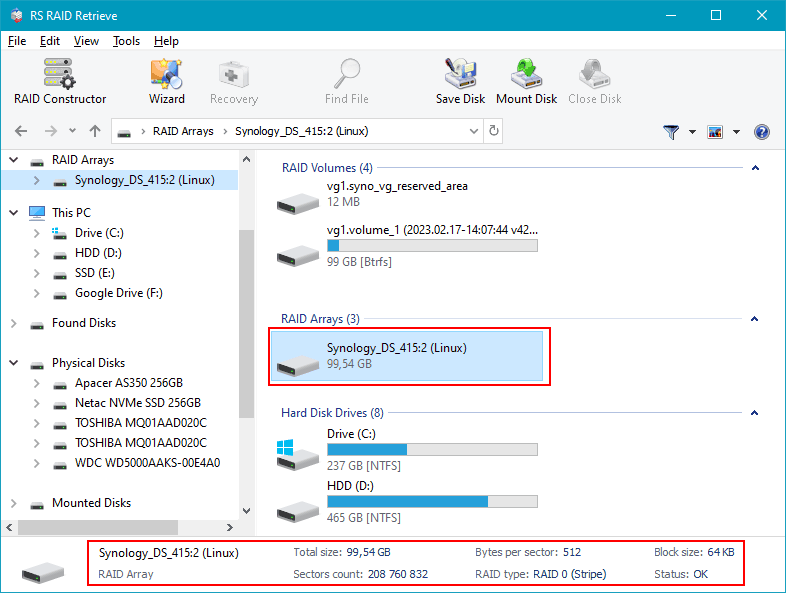
Step 4 Confirm or manually set RAID parameters.
If auto-detection fails or metadata looks inconsistent, enter RAID 0 or RAID 1 settings manually based on your NAS configuration. Damaged RAID metadata often requires this step.
-
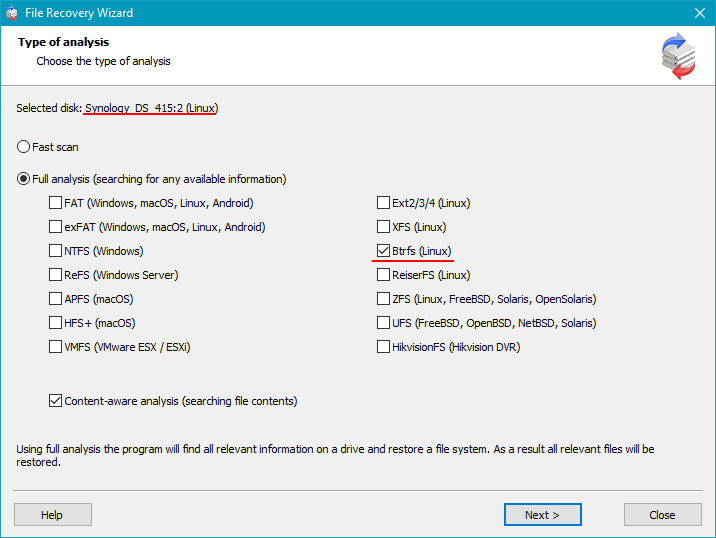
Step 5 Start a full scan.
The tool rebuilds the filesystem structure, trying to recover deleted or corrupted files from fragmented metadata and partial RAID stripes.
-
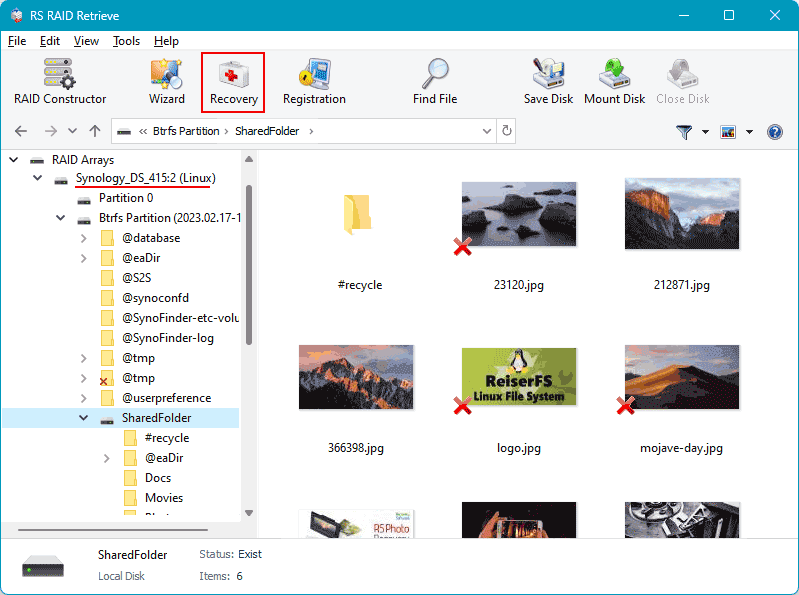
Step 6 Review recovered folders.
Check photos, videos, documents, and verify file integrity before exporting. This helps spot any missing or corrupted files.
-
Step 7 Export recovered data to a separate drive.
Save files to a different disk or partition to avoid overwriting data on the original NAS drives, which could hinder further recovery.
Tip: Don’t write new data to the source NAS drives during recovery to keep the current state intact and improve chances of successful data salvage.
Why RAID fails in 2-disk NAS Asustor AS5402T
RAID failure on a 2-disk Asustor AS5402T NAS usually results from a combination of hardware wear, unstable system conditions, and filesystem errors. Because the two drives are closely linked, even minor differences in disk health or SMART data can destabilize the array quickly. Below are common failure scenarios that often lead to data recovery needs.
1. One disk disappears. RAID problems often start when one drive suddenly vanishes from the NAS dashboard. This can be caused by firmware bugs in the controller, intermittent electrical issues, or gradual mechanical failure that makes the disk drop out of the device list.
2. Noticeable slowdown. When the RAID begins to fail, users typically notice slower file operations—read/write speeds drop and folder access lags. These signs indicate synchronization issues, as the system struggles to keep parity or mirror data consistent during degraded mode or rebuilds.
3. “Degraded” or “Crashed Volume” warnings. The NAS marks the array as Degraded once redundancy is lost, meaning data integrity can no longer be assured. If this condition continues, it may escalate to a Crashed Volume, where metadata corruption or incompleteness requires advanced recovery tools.
4. Files become inaccessible. In RAID 0 or simultaneous disk failures, files may fail to open or trigger errors like “File Corrupted” or “Directory Unavailable.” This usually points to data inconsistencies or missing stripes caused by disk loss.
- Sudden drive dropouts that aren’t logged by the system
- Parity or mirror desync from interrupted rebuilds
- Sector-level wear visible in SMART stats and bad block counts
- Unexpected power outages causing RAID metadata corruption and array failures
The main causes of data loss in NAS devices
Disk failure. Physical wear or sudden breakdowns of HDDs or SSDs are common reasons for data loss, especially in 2-disk NAS setups where RAID0 lacks redundancy and RAID1 relies entirely on drive health. Bad sectors or complete disk failures often cause arrays to degrade or rebuild attempts to fail.
Human errors (deletion, formatting). Accidentally deleting important files or reformatting volumes without backups can make data unreachable. Recovery depends largely on how fast the system is taken offline to avoid overwriting, and whether the NAS supports snapshots or journaling features.
Firmware or DSM update errors. Interrupted or failed firmware and DSM updates can corrupt RAID metadata or partition tables, causing arrays to drop or become inconsistent. Fixing this usually involves manual RAID reassembly and rebuilding metadata to restore access.
Power problems and sudden shutdowns. Losing power abruptly during writes can corrupt the filesystem and interrupt RAID sync processes. This often results in degraded arrays or filesystems mounting as read-only, requiring thorough data integrity checks and careful recovery steps.