When someone contacts a data recovery specialist about a failed array, the answer to “which RAID level is it?” shapes everything that follows. RAIDZ1 and RAID 5 share the same fundamental idea — distribute parity across disks so any single drive can be lost without data loss — but they behave quite differently under stress. Those differences become very concrete once you’re staring at a degraded array. This article focuses on what the architectural differences mean for failure probability, recovery difficulty, and which tools actually work in each case.
Contents
- How Each Array Is Actually Built
- The Write Hole and Silent Corruption
- Capacity and Performance
- Failure Mode Comparison
- Rebuild Risk with Large Drives
- Recovering Data from RAIDZ1
- Recovering Data from RAID 5
- RS RAID Retrieve: Software Recovery for Both Configurations
- Which One to Choose — and When It Matters for Recovery
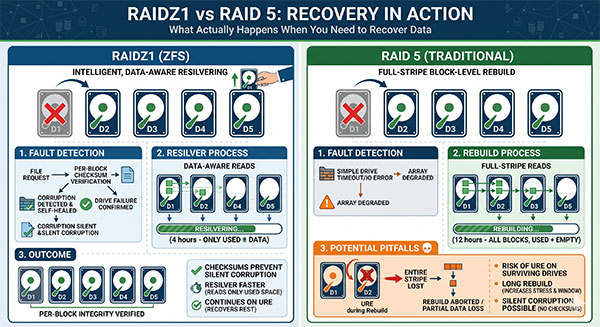
Both configurations tolerate a single disk loss. The similarity ends there — especially the moment something goes wrong.
How Each Array Is Actually Built
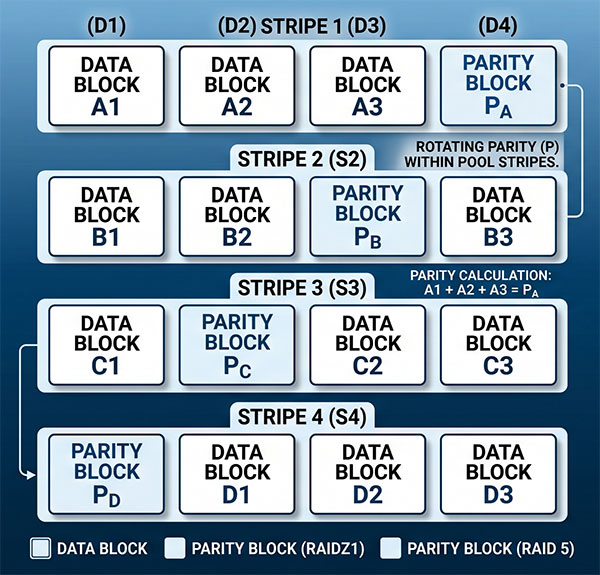
RAID 5 distributes data and parity in fixed-width stripes across all member drives — commonly 64 KB or 128 KB, set by the controller and never changed. Every write touching less than a full stripe triggers the classic read-modify-write cycle: read old data, read old parity, compute new parity, write both back.
This cycle is the root cause of the write hole and several other problems discussed below.
RAIDZ1 is a vdev type within ZFS — the pool layer is inseparable from the file system. ZFS groups each record’s blocks into a variable-width stripe that spans all disks simultaneously. There is no partial-stripe write; every write is always a full stripe. This eliminates the read-modify-write cycle entirely and closes the write hole.
A RAIDZ1 vdev cannot be expanded after creation. You can add a new vdev to the pool, but the original stays fixed. RAID 5 allows online expansion in many implementations — a flexibility advantage that is occasionally a source of new corruption.
The Write Hole and Silent Corruption
The write hole is specific to RAID 5: if power is cut between writing new data and writing the updated parity, data blocks and parity no longer agree. Most controllers silently accept this inconsistency on the next boot and mark the array healthy — the parity is simply wrong for that stripe. Nobody notices until a second disk fails during rebuild, at which point that stripe cannot be reconstructed and data loss occurs with no prior warning.
Recovery note: When a RAID 5 appears to suffer a two-drive failure but only one drive is physically bad, write-hole inconsistency is a likely culprit. Image each disk first and analyze parity consistency across the suspect stripe before assuming both drives are dead.
ZFS avoids this through copy-on-write semantics: data is never written over existing blocks. If power fails mid-write, ZFS discards the incomplete transaction on the next mount. The array is always consistent from the moment it comes online.
The second integrity problem is silent data corruption (bitrot). Drives occasionally return wrong data without raising an error flag. RAID 5 has no checksums to compare against and accepts whatever the drive returns. ZFS computes a checksum for every block on write and verifies it on read — when a block fails, ZFS reconstructs it from parity and rewrites the corrected data. On a RAID 5, the same corruption passes silently to the application.
Silent corruption is more common than people expect on arrays running for three or more years. RAID 5 arrays on older drives frequently show it only when a recovery attempt reveals parity mismatches across dozens of stripes — none of which ever triggered a controller alert.
Capacity and Performance
Both configurations use the same capacity formula: (N − 1) × drive size, with a minimum of three disks. Five 8 TB drives yield 32 TB of usable space in either configuration. The differences are in write behavior:
- RAID 5 with battery-backed hardware cache handles mixed workloads well — the cache absorbs bursts and manages the read-modify-write cycle off the critical path. Without that cache, write latency climbs noticeably for small random writes.
- RAIDZ1 performs well for sequential workloads with large record sizes — media storage, backups, VM images. Small random writes are its weakness: each write forms a complete stripe, making IOPS-heavy workloads like databases a poor fit without L2ARC and SLOG on fast NVMe.
- Sequential read throughput is roughly comparable — each array reads from multiple drives in parallel, so neither has a meaningful advantage here.
Failure Mode Comparison
The table below covers scenarios most commonly encountered in real-world recovery work.
| Failure Scenario | RAIDZ1 (ZFS) | RAID 5 (Traditional) |
|---|---|---|
| Single disk failure | Array continues; resilver from pool | Array continues; rebuild to hot spare or new disk |
| Second disk fails during rebuild | Data loss — same as RAID 5 | Data loss — no parity available |
| Power loss during write | CoW ensures consistency; no corruption | Write hole risk — parity may be wrong for affected stripe |
| Silent bitrot / bad sector | Checksum detects it; ZFS repairs from parity | Passes silently to application; undetected |
| Controller failure | ZFS pool imports on any system with ZFS — no controller dependency | Proprietary controllers may lock you in; software RAID (mdadm) is more portable |
| ZFS / RAID metadata corruption | ZFS keeps multiple copies of metadata; usually recoverable | RAID superblock loss — array parameters may need manual reconstruction |
| Disk order scrambled | ZFS identifies disks by GUID; disk order is irrelevant | Wrong disk order produces a valid-looking but corrupt array; easy to worsen |
| Accidental pool/array deletion | ZFS labels on each disk survive; zpool import often recovers |
Superblock overwrite can make software recovery much harder |
| URE during rebuild (large drives) | ZFS scrub detects in advance; resilver skips empty blocks | Full-stripe rebuild reads every sector; any URE = unrecoverable stripe |
Rebuild Risk with Large Drives
On drives larger than roughly 4–8 TB, single-parity protection becomes a serious operational risk. The rebuild process reads every sector of every surviving drive — on a 16–20 TB drive, this takes many hours under elevated I/O load. Enterprise drives specify a URE rate of ~1 error per 1015 bits; consumer drives are ten times worse. For a four-drive array with 12 TB drives, a rebuild reads ~36 TB — encountering a URE is plausible, not rare.
ZFS has a modest advantage: resilvering reads only allocated blocks. A 40%-full array rebuilds roughly 40% of the data. A RAID 5 rebuild always reads the full drive capacity regardless of how much data is present — a meaningful difference in both time and risk for partially filled arrays.
Practical guidance: For drives larger than 8 TB, upgrade to RAIDZ2 or RAID 6 (dual parity). Single-parity configurations remain reasonable for smaller arrays where rebuild time stays under a few hours.
Recovering Data from RAIDZ1
RAIDZ1 recovery benefits from ZFS’s self-describing nature. Each disk carries four label copies containing the pool GUID, vdev configuration, and transaction group number. Connect the disks to any machine running ZFS and zpool import identifies and mounts the pool — no knowledge of the original system required. A controller failure that stops a RAID 5 cold has no effect on a ZFS pool as long as the disks are physically accessible.
Common RAIDZ1 recovery scenarios, in order of difficulty:
- Checksum or I/O errors on scrub — ZFS marks the vdev degraded and repairs affected blocks from parity. Replace the degraded drive with
zpool replace, then runzpool scrub. The resilver reconstructs only affected blocks. - Corrupted ZFS metadata (uberblock, MOS, object directory) — ZFS keeps multiple copies and can roll back to an earlier transaction group. The
zdbutility exposes internal pool state and is the starting point for forensic examination. - Pool cannot be imported at all (two or more disks failed, or labels damaged on multiple disks) — software recovery tools become necessary. You need a tool that understands ZFS block pointers, compression, and variable-width stripe geometry, not one that treats the array as a generic fixed-stripe block device.
For a detailed walkthrough of ZFS pool recovery in TrueNAS environments, see How to Recover Data from a RAID-Z Array in TrueNAS.
Recovering Data from RAID 5
RAID 5 recovery difficulty varies widely because array parameters are not stored in a universally readable format. Hardware controllers keep disk order, stripe size, parity algorithm, and block offset in proprietary metadata or onboard NVRAM. If the controller dies, you need either an identical replacement (sometimes matching the exact firmware revision) or software that can reconstruct the configuration from raw disk data. Software RAID 5 via mdadm is more portable — the superblock on each member disk contains the array parameters. The superblock itself, however, is the vulnerability: overwrite it, and reassembly becomes a fully manual process.
The critical steps for any RAID 5 recovery, in order:
- Create sector-by-sector images of every disk before touching anything. Working from images rather than live disks means any mistake can be retried from the original state. This is the single most important step.
- Do not let the controller initiate a rebuild automatically. If any surviving disk encounters a URE during that process, the stripe is lost permanently. Disable auto-rebuild until you have images.
- Reconstruct disk order — wrong disk order produces a valid-looking but corrupt array. The parity rotation pattern in standard left-symmetric RAID 5 makes this verifiable without guessing.
- Identify stripe size — common values are 64 KB, 128 KB, and 256 KB. The correct value produces recognizable file system signatures at expected offsets. Recovery software automates this entirely.
For a detailed breakdown of failure scenarios including what to do when a controller misconfigures the array after a drive swap, see How to Recover Data from RAID 5.
RS RAID Retrieve: Software Recovery for Both Configurations
When the array cannot be reassembled by the OS — controller dead, superblock damaged, or disks moved from a NAS to a different machine — software reconstruction is the right next step before sending drives to a lab.

Data recovery from damaged RAID arrays
RS RAID Retrieve handles both array types without requiring the user to know the parameters in advance. Key capabilities relevant to recovery work:
- Automatic parameter detection for RAID 5 — the software tests candidate configurations (disk orderings, stripe sizes, parity algorithms) and presents the one that produces a consistent, mountable file system. This eliminates the guesswork that causes further corruption when recovery is attempted without verified parameters.
- ZFS pool reconstruction for RAIDZ1 — reads pool labels from each disk, identifies pool GUID and vdev configuration, and reconstructs array geometry. Reconstruction succeeds even when some labels are damaged, as long as a quorum of readable labels remains.
- Partial extraction beyond fault-tolerance threshold — for RAID 5 or RAID 6 arrays with more failed drives than parity allows, the software extracts blocks that exist on surviving drives. In practice, this often recovers the majority of data from what looks like a total loss.
- Works with disk images — a forensic copy of each disk eliminates the risk of a second failure during the recovery attempt itself.
Important: Never save recovered files back to any member drive of the array being recovered. Use a separate drive with capacity exceeding the array’s total usable space.
Which One to Choose — and When It Matters for Recovery
The choice has recovery implications beyond architecture. Choose based on your environment:
- Choose RAIDZ1 if you already run ZFS (TrueNAS, Proxmox, custom Linux). Integrated checksums, copy-on-write consistency, and controller-independent portability all reduce the probability of an unrecoverable situation. A dead controller is a non-event for a ZFS pool.
- Choose RAID 5 if your environment uses a hardware RAID controller and has no ZFS infrastructure. Run regular consistency checks, verify SMART data on all drives before any rebuild, and maintain a current backup — confirm it is valid before initiating a rebuild operation.
For either configuration, the most important factor in recovery outcomes is what you do in the first hour. Stop all writes immediately. Do not initialize, reformat, or run fsck / chkdsk on the raw drives. Create images first — then assess whether to proceed with software recovery or engage a lab based on the number of failed drives and any physical damage.
Both RAIDZ1 and RAID 5 share the same fundamental risk: a second drive failure during rebuild ends in data loss. For drives exceeding 8 TB or genuinely irreplaceable data, dual-parity configurations — RAIDZ2 or RAID 6 — provide a safety margin that single parity cannot match.
Frequently Asked Questions
zpool import will find the pool automatically. You do not need the original hardware, controller, or operating system.
zpool iostat -v, treat it as a candidate for replacement before it degrades further.