When a disk in a RAID array fails, the server administrator or NAS owner faces a critical choice: start a standard rebuild or use RAID data recovery software. A conventional rebuild can take from several hours to a week depending on disk capacity and RAID level, leaving the system exposed to subsequent failures. The alternative is software, which is especially important in cases of multiple disk failures or when the business cannot afford prolonged downtime.
Contents
- What Is RAID Rebuild / Reconstruction
- How Long Does a RAID Rebuild Take
- Risks of prolonged RAID rebuild and the software recovery alternative
- How to recover data from damaged RAID arrays using software
This article examines the real recovery times for different RAID configurations, compares hardware rebuild to software-based approaches, and helps you choose the optimal strategy for your scenario.
What Is RAID Rebuild / Reconstruction
A RAID rebuild (also called reconstruction or resynchronization) is the process by which a RAID controller or software reconstructs missing data on a replacement drive using the remaining disks in the array (e.g. via parity or mirroring). This ensures the array returns from a degraded state to fully redundant.
When a disk in the array fails, the RAID controller marks it as failed and the array enters degraded mode. After a new disk is installed, the controller updates the array by reading data from the remaining healthy disks and computing data for the new disk based on the parity or mirroring scheme, depending on the RAID level.
Rebuilds can be automatic (triggered when a new drive is inserted into a degraded array) or manual (initiated by an administrator), depending on your RAID controller or software.
During rebuild, the array remains operational, but performance is reduced and there is no protection against further failures.
Rebuild speed is driven by several critical factors: disk capacity (larger disks take longer), RAID level (RAID 6 rebuilds take longer than RAID 5 due to dual parity), current system load (active I/O significantly slows the process), and controller type.
Hardware RAID controllers typically outperform software implementations thanks to a dedicated processor and cache. Even so, high-performance controllers must balance rebuild speed against serving ongoing data requests. Many systems allow configuring rebuild priority: high priority accelerates recovery but reduces application performance; low priority minimizes impact on production but can stretch rebuild into days. It is especially important to understand that during rebuild the system is in a critical state—another disk failure in RAID 5 or two more in RAID 6 will result in complete data loss with no automatic recovery.
How Long Does a RAID Rebuild Take
The rebuild time can range from a few hours to several days or more for large arrays.
Below is a simplified formula often used to estimate rebuild time::
Rebuild time = (Data volume / Disk read speed) × Overhead factor
- RAID 1: factor = 1.0
- RAID 5: factor = 1.4 (40% additional time for parity computation)
- RAID 6: factor = 1.8 (80% additional time for dual parity computation)
Rebuild throughput depends on disk and controller type, but for modern HDDs averages 50–100 MB/s when idle. This means rebuilding 1 TB of data at 80 MB/s takes roughly 3.5 hours. However, real-world times are always higher due to parity computation overhead, data verification, and fragmentation.
RAID 1, which uses simple mirroring, rebuilds relatively quickly by copying data byte-for-byte from the healthy disk to the new one. For a two-disk 1 TB mirror, the process takes 3–6 hours depending on disk speed. RAID 5 requires significantly more time because it must read data from all disks in the array and compute parity information. With the minimum three-disk setup, the controller must read 2 TB of data, compute parity, and write 1 TB to the new disk, which takes 6–12 hours.
RAID 6 with dual parity takes even longer because it computes two independent parity blocks. A minimum four-disk configuration typically rebuilds in 8–16 hours, as the controller processes more data and performs more complex math. RAID 10, combining mirroring and striping, rebuilds faster than RAID 5 and 6 because it only needs to copy from the mirror without parity computation.
Rebuild time estimates for arrays with 1 TB disks
| RAID level | Number of disks | Array capacity | Rebuild time (idle) |
|---|---|---|---|
| RAID 0 | 2 | 2 TB | No rebuild* |
| RAID 1 | 2 | 1 TB | ~3.5 hours |
| RAID 5 | 3 | 2 TB | ~7 hours |
| RAID 5 | 4 | 3 TB | ~10.5 hours |
| RAID 5 | 5 | 4 TB | ~14 hours |
| RAID 6 | 4 | 2 TB | ~10 hours |
| RAID 6 | 5 | 3 TB | ~15 hours |
| RAID 6 | 6 | 4 TB | ~20 hours |
| RAID 10 | 4 | 2 TB | ~3.5 hours |
| RAID 10 | 6 | 3 TB | ~3.5 hours |
| RAID 10 | 6 | 3 TB | ~3.5 hours |
*RAID 0 provides no redundancy—if one disk fails, some data may be recoverable, but not all.
Note: Estimates assume an average rebuild throughput of 80 MB/s for 7200 RPM HDDs and account for parity overhead (~40% for RAID 5, ~80% for RAID 6). With SSDs, times may be 2–3x lower. Under production load, times increase by 2–4x.
Risks of prolonged RAID rebuild and the software recovery alternative
Risks of a long RAID rebuild
The rebuild process creates a critical window of vulnerability when the system is especially prone to catastrophic failure.
The primary threat is a second disk failure during rebuild. In RAID 5, another failed disk leads to complete data loss because the array is already operating in degraded mode with no redundancy.
The likelihood of this scenario increases for several reasons: disks in an array are typically purchased together and have the same age and duty cycle, they operate under identical conditions, and the rebuild process imposes heavy load on the remaining disks, accelerating latent defects.
UREs (Unrecoverable Read Errors) pose a particular danger—bad sectors may only be detected during the full-volume reads performed by a rebuild.
If the controller encounters a URE during a RAID 5 rebuild, the process may fail entirely, as missing reads make it impossible to compute correct parity for the new disk.
The longer the rebuild takes, the higher the risk of catastrophic array failure.
Software-based RAID recovery: an alternative approach
An alternative approach is to use data recovery software for damaged or failed RAID arrays without running a standard controller-based rebuild. Unlike hardware rebuild through the controller, these tools operate at the file system and data level, analyzing the array structure and extracting information even from severely damaged configurations.
The core principle is reconstructing RAID geometry: the software scans available disks, identifies array parameters (disk count, stripe size, striping order, parity layout), rebuilds the logical structure, and provides access to files without physically altering the disks.
Software recovery is preferable—or the only option—in several critical scenarios.
- Two or more disks failed (RAID 5) or three or more (RAID 6)
- RAID controller failure or lost configuration
- Critical data required immediately; no time for a rebuild
- A rebuild attempt has already failed due to UREs or other errors
- Array accidentally deleted or reinitialized
- Data migration from old/unstable hardware
- A safe recovery attempt is needed without risking further damage
How to recover data from damaged RAID arrays using software
Recovering data from a damaged or non-functional RAID array does not have to be complex. Most tools follow the same approach: attach the array’s disks to a computer (or connect to the array over SSH), perform a quick analysis, then save the recovered data to a safe destination, such as a new RAID array.
Consider the recovery process using RS RAID Retrieve as an example.

Data recovery from damaged RAID arrays
Step 1. Connect disks and initialize
After physically connecting the disks from the failed array to a working computer, launch the recovery software. It will perform an automatic search for RAID configurations on the attached hard drives or added images. Discovered arrays will be added to the main window.
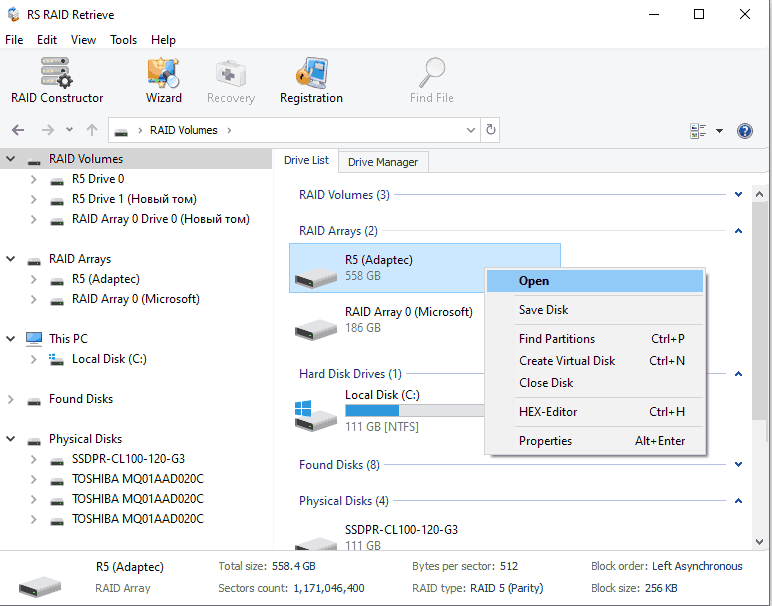
If there are damaged disks with unstable reads, create disk images first.
Step 2. Analyze the array’s file system
Run a Quick scan of the array. The software will analyze the file system, reconstruct the directory structure, enumerate file metadata, and display the recovered data tree in the interface.
At this stage you can assess data condition: browse file lists, check integrity, and preview individual files.
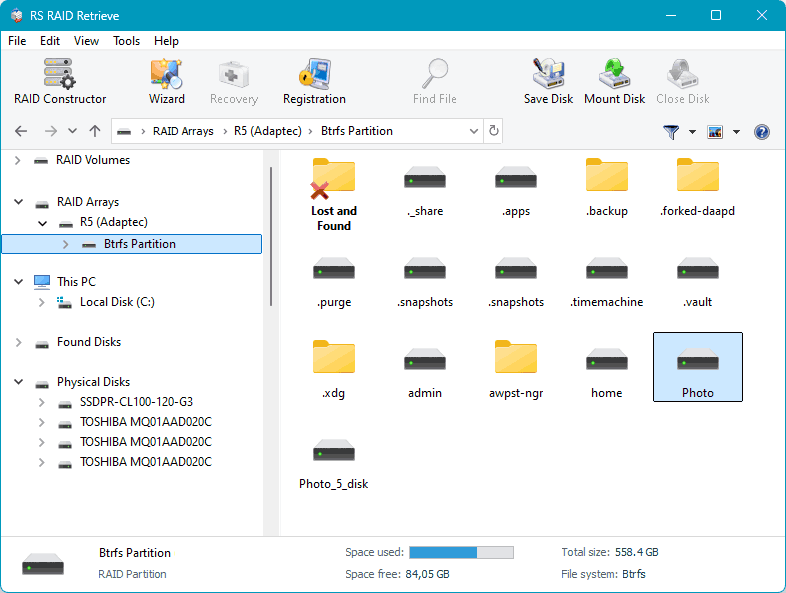
The quick scan works with file system metadata and usually completes in 20–60 minutes for 1–4 TB arrays. If the quick scan does not find everything you need (e.g., due to file system damage), most tools offer a full scan—a longer process.
Step 3. Extract and save data
Select the data to transfer to a new RAID array or a hard drive with sufficient capacity, and save it.
The copy time is proportional to data volume—about 20 minutes per terabyte at an average throughput of 850 MB/s. The software reconstructs data on the fly, reading from available disks and, when necessary, rebuilding missing blocks via parity computation.
Software-based RAID recovery time estimates
| RAID level | Number of disks | Array capacity | Recovery time* |
|---|---|---|---|
| RAID 0 | 2 | 2 TB | ~40 minutes |
| RAID 1 | 2 | 1 TB | ~20 minutes |
| RAID 5 | 3 | 2 TB | ~40 minutes |
| RAID 5 | 4 | 3 TB | ~60 minutes |
| RAID 5 | 5 | 4 TB | ~80 minutes |
| RAID 6 | 4 | 2 TB | ~40 minutes |
| RAID 6 | 5 | 3 TB | ~60 minutes |
| RAID 6 | 6 | 4 TB | ~80 minutes |
| RAID 10 | 4 | 2 TB | ~40 minutes |
| RAID 10 | 6 | 3 TB | ~60 minutes |
| RAID 10 | 6 | 3 TB | ~80 minutes |
* Time shown covers reconstruction and extraction after the software has identified the array configuration. Estimate based on average read/reconstruction speed of ~50 GB/min (850 MB/s) using modern software on a high-performance system.
When choosing RAID recovery software, check support for your specific RAID level, OS compatibility, file preview before purchase, the ability to work from disk images for safer recovery, and the quality of technical support.
A review of the best tools—their capabilities, pros and cons, along with feature and price comparisons—is available here: Top RAID data recovery software.
Speed comparison: rebuild vs. software recovery
| Array size | RAID rebuild (idle) | Software-based recovery |
|---|---|---|
| 1 TB | ~3.5 hours | ~20 minutes |
| 2 TB | ~7 hours | ~40 minutes |
| 3 TB | ~10.5 hours | ~60 minutes |
| 4 TB | ~14 hours | ~80 minutes |
Important: Software-based recovery provides fast access to data for extraction but does not restore a working RAID array. Returning the system to service requires additional time to create a new array and copy the recovered data back.
The choice between a standard rebuild and using software depends on the specific situation, array condition, and data criticality. Hardware-based rebuild remains a reliable solution for straightforward single-disk failures when the system can operate in degraded mode for the required period.