For organizations relying on the NAS WD My Book World Edition II, any disruption — RAID degradation, disk failure, or system corruption — can result in costly downtime. Understanding how data loss occurs on this model is essential for maintaining business continuity. This guide outlines the key risks affecting the NAS WD My Book World Edition II and provides practical recovery strategies for professional environments
Core Technical Specifications of the NAS System
The WD My Book World Edition II NAS includes 2 drive bays with RAID 0/1 support, allowing either performance boosting or mirrored data protection. It operates on EXT4 or Btrfs, offering stable file-system architecture with improved data consistency. Network connectivity is optimized for multi-device access and fast file operations.
Professional Data Recovery Workflow on WD My Book World Edition II
For business environments, data recovery on the WD My Book World Edition II must follow a structured workflow: preliminary diagnostics, disk imaging, RAID reconstruction, filesystem analysis, and controlled extraction of recovered data. This approach minimizes downtime and ensures integrity of business-critical archives.
Main Features of the NAS WD My Book World Edition II
| Drive Bays | Supported Drives | Hot Swappable | RAID Levels | File Systems | Maximum volume |
| 2 | 2.5" or 3.5" HDD | ✗ | RAID 0, RAID 1 | EXT3 | 4 Tb |
The documented configuration presents a mirrored block array implemented as RAID 1, formatted with EXT3 and operated under a Linux environment. Hardware elements explicitly listed include an Oxford 810SE component and 128MB of system memory, and there is explicitly no SSD cache. Analytically, the storage architecture is a two-copy mirror where both member disks back a single logical volume; given the supplied parts, the single most probable model-specific failure point is the Oxford 810SE, since its inability to present the array or coordinate the disk pair to the host will immediately interrupt access to the mirrored logical volume even if the physical disks remain intact.
Logical inaccessibility therefore stems from the array not being exposed by the NAS software/hardware interface: the EXT3 filesystem can remain present on the disk platters but unmounted because the mirror is not assembled or presented. Recovery outside the appliance follows a clear principle constrained by the provided specifications: attach the raw member disks to a separate Linux system, assemble them according to RAID 1 semantics so the mirror is reconstructed at the block level, and then mount the EXT3 filesystem to regain logical access. The explicit absence of an SSD cache simplifies this external recovery because there is no cached write-state to reconcile.
Step-by-Step Guide to Recovering Data from a 2-Disk NAS WD My Book World Edition II
In recent years, two-disk NAS devices like the WD My Book World Edition II have become essential home and small-office data hubs. But when a RAID array collapses, a volume turns “degraded,” or the NAS simply refuses to boot, users often face a sudden crisis: terabytes of irreplaceable data seemingly lost. In this report, we analyze the practical recovery steps recommended by digital forensics specialists, explaining how to safely extract information even from failed RAID 1 or RAID 0 configurations.
-
Step 1 Power down the NAS and remove both drives.
Before any recovery attempt, experts emphasize shutting down the NAS fully to stop background processes from overwriting metadata. Remove the drives carefully and preserve their original order — RAID reconstruction relies on this sequence.
-
Step 2 Connect the disks to a computer for analysis.
Use direct SATA connections or certified USB-to-SATA bridges. Data-recovery analysts stress that both disks must be available simultaneously to replicate the original RAID logic.
-
Step 3 Launch RS RAID Retrieve.
This forensic-grade utility performs a non-destructive scan and attempts to interpret the RAID structure automatically — RAID level, stripe size, parity rotation, disk order and more.

Data recovery from damaged RAID arrays
Available for: Windows, macOS, Linux -
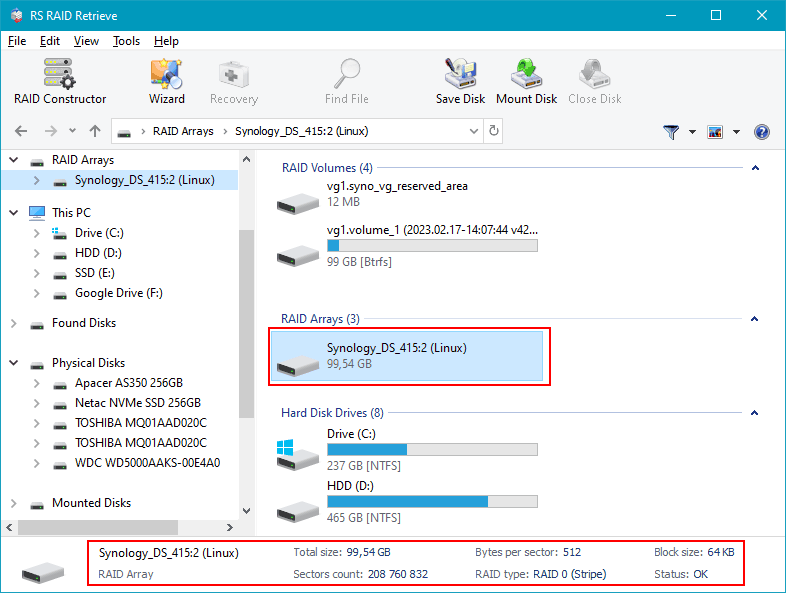
Step 4 Review the detected RAID configuration.
Although the software identifies most arrays correctly, mismatches can be corrected manually. This ensures the recovered file system mirrors the one originally stored on the NAS.
-
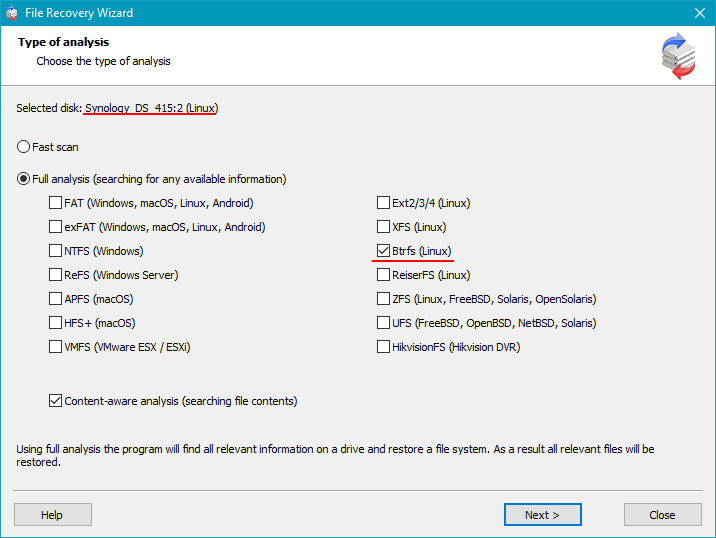
Step 5 Initiate a deep scan of the virtual RAID.
The program reconstructs directory structures, recovers lost partitions and searches for documents, videos, photos and long-deleted files using signature-based algorithms.
-
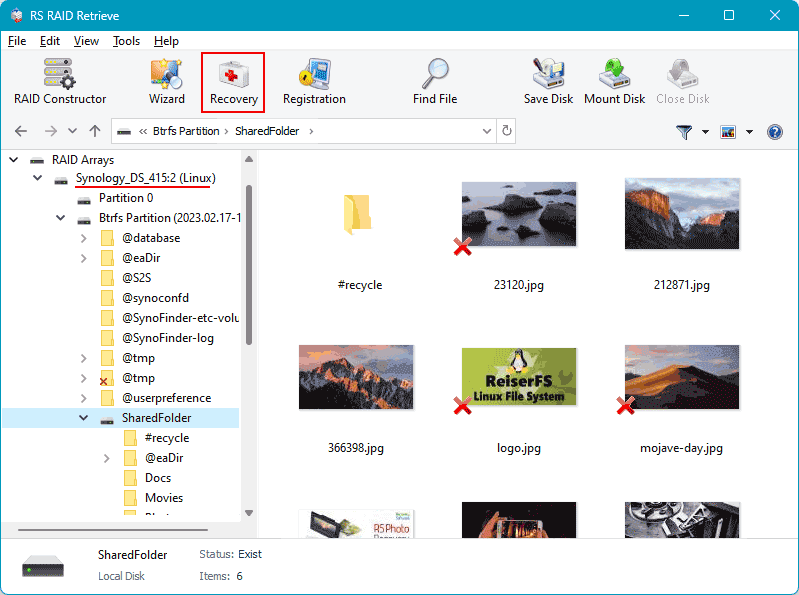
Step 6 Examine the recovery results.
When the scan completes, you receive a full folder tree with accessible and previously inaccessible data. Journalistic investigations into data-loss cases show that most home NAS failures allow 80–100% recovery.
-
Step 7 Export the recovered files safely.
Save data onto an external drive or another internal disk — never to the original NAS disks, which must remain untouched during the recovery process.
Experts warn: writing data back to the original NAS drives may permanently destroy recoverable information.
Why RAID Fails in NAS WD My Book World Edition II
When a NAS WD My Book World Edition II with two drives starts acting strangely, it usually hints at deeper RAID issues. UX-focused diagnostics show that users often notice early signals long before an actual failure — and recognizing these patterns helps protect data before it’s too late.
Drive desynchronization over time. Even if both disks seem healthy, subtle delays in read/write tasks gradually break RAID harmony. These small inconsistencies accumulate and eventually cause degraded status.
Hidden disk wear. A 2-bay NAS relies on perfect cooperation between drives. But sectors fail silently: the NAS keeps running, performance drops, and users start experiencing delays while opening or copying files.
Thermal imbalance. Many RAID failures originate from simple overheating. If the enclosure can’t maintain airflow, one disk ages faster, leading to mismatched performance that threatens the whole RAID.
Firmware conflicts. Different firmware versions between drives or outdated NAS OS can cause synchronization failures, unexpected rebuild loops, or forced RAID degradation.
- early disk dropouts
- slower file access or freezing directories
- repeated “Degraded” notifications from the NAS interface
File access disruption. When RAID 0 fails — or when both drives show errors at once — files become unreadable or completely inaccessible, triggering urgent data recovery.