Data recovery from a NAS Promise Apollo Cloud 2 Duo becomes necessary when the device stops responding, the RAID array degrades, or important files disappear without warning. Typical causes include disk failures, corrupted firmware, accidental deletions, or logical corruption that take the storage offline. This guide outlines common failure scenarios with the Promise Apollo Cloud 2 Duo and provides practical recovery steps aimed at restoring access while avoiding further damage.

Technical Specifications of NAS Promise Apollo Cloud 2 Duo
The NAS Promise Apollo Cloud 2 Duo comes with 2 drive bays, allowing setups that balance storage capacity and redundancy for home or small office use. It supports RAID 0 and RAID 1, offering either improved performance through striping or fault tolerance via mirroring. The device works with EXT4 and Btrfs filesystems, each with unique metadata layouts and snapshot features that influence recovery methods.
When recovering data from the Promise Apollo Cloud 2 Duo, it's crucial to consider the RAID configuration, block order, and filesystem type. These elements affect how well files can be restored after disk failures, interrupted rebuilds, or accidental deletions, especially when metadata is damaged or arrays are only partially functional.
Key Specifics of Data Recovery on Promise Apollo Cloud 2 Duo
Recovering data from a Promise Apollo Cloud 2 Duo NAS requires understanding how these two-bay systems manage storage arrays. The device usually supports RAID 0 and RAID 1 setups. In RAID 0, losing one disk means the entire array fails, so recovery depends on specialized tools to reconstruct fragmented data. RAID 1 provides redundancy through mirroring, but if both drives are corrupted or the EXT4 or Btrfs file systems get damaged, accessing the disks directly with a forensic workstation is often necessary to retrieve data.
These two-bay NAS units are often used to store personal media like photos and videos, as well as work-related archives. As a result, recovery typically focuses on restoring user-generated content and important office files.
Main Features of the NAS Promise Apollo Cloud 2 Duo
| Drive Bays | Supported Drives | Hot Swappable | RAID Levels | File Systems | Maximum volume |
| 2 | 2.5" or 3.5" HDD, SSD | ✗ | RAID 0, RAID 1, JBOD | EXT4 | 20 Tb |
The unit presents a mirrored block layout: the dominant storage architecture is a RAID 1 mirror managed by Apollo OS (Linux-based) and formatted with EXT4. The on-board compute environment is a Marvell Armada 88F3720 dual‑core processor with 1GB of system memory and no SSD caching layer, which constrains in‑device buffering and offloads all write coherency and metadata updates to the OS and storage drives. Given these specifications, the single most probable model‑specific failure point is an EXT4 metadata divergence or corruption between the mirrored members as administered by the appliance software: with limited RAM and a software RAID stack inside the Apollo OS, interrupted or inconsistent metadata updates can leave the two mirrors out of sync or leave filesystem metadata in an inconsistent state on both members.
When EXT4 metadata is inconsistent or damaged, the filesystem tree and allocation maps become unreliable and the operating system cannot present a coherent logical filesystem, rendering user data inaccessible even though raw blocks remain on the disks. Recovery outside the NAS therefore depends on exposing the original mirror members to a Linux environment that understands the device’s RAID 1 layout and the EXT4 on‑disk format, reconstructing or assembling the mirror externally so the logical block stream is restored, and repairing the EXT4 metadata structures so the filesystem hierarchy and allocation maps can be rebuilt and mounted. The absence of an SSD cache removes a separate caching layer from consideration, so recovery focuses on mirror assembly and filesystem metadata repair.
Step-by-Step Guide to Recover Data from NAS Promise Apollo Cloud 2 Duo
Recovering data from a two-bay Promise Apollo Cloud 2 Duo is possible even after RAID degradation, interrupted rebuilds, or EXT4/Btrfs filesystem issues. Use the following steps to retrieve your data while minimizing additional risks:
-
Step 1 Power down the NAS and remove both drives.
Shut down the device completely before removing the disks. Note their original slots carefully—this is essential for correct RAID reconstruction.
-
Step 2 Connect the drives to a workstation.
Attach both drives at once using SATA ports or USB-to-SATA adapters. Detecting them simultaneously is key to identifying the RAID state accurately.
-
Step 3 Launch the recovery tool.
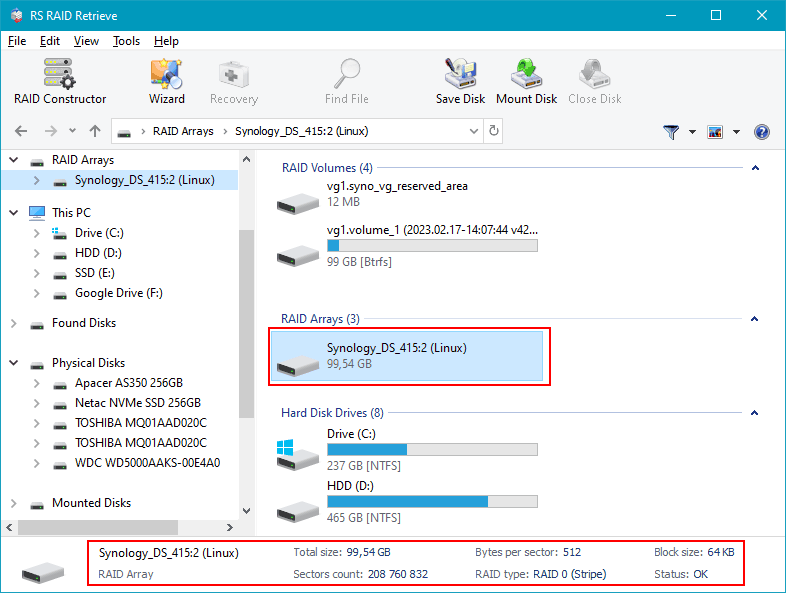
Open RS RAID Retrieve. It will scan both disks for RAID metadata. Check the RAID parameters displayed—if metadata is corrupted, you may need to verify settings manually.

Data recovery from damaged RAID arrays
Available for: Windows, macOS, Linux -
Step 4 Confirm or set RAID parameters manually.
If automatic detection fails due to damaged RAID headers or inconsistent metadata, enter RAID 0 or RAID 1 parameters based on your original configuration.
-
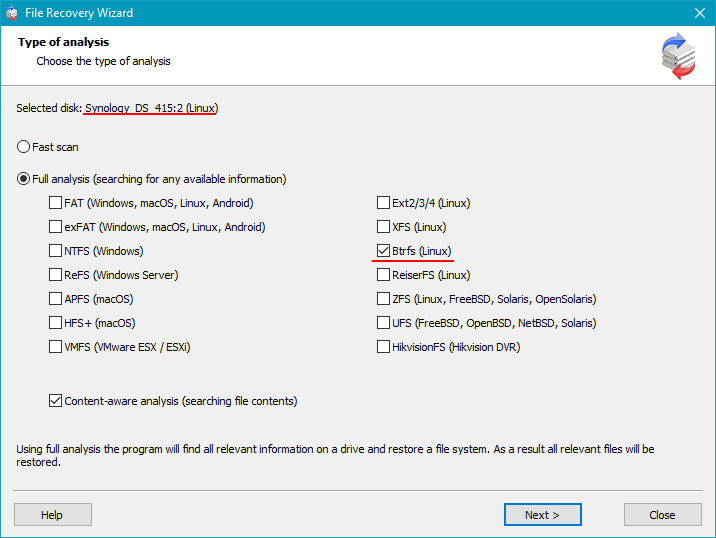
Step 5 Run a full scan.
The tool will rebuild the filesystem tree and try to recover files from deleted entries or corrupted extents, which often occur after interrupted rebuilds.
-
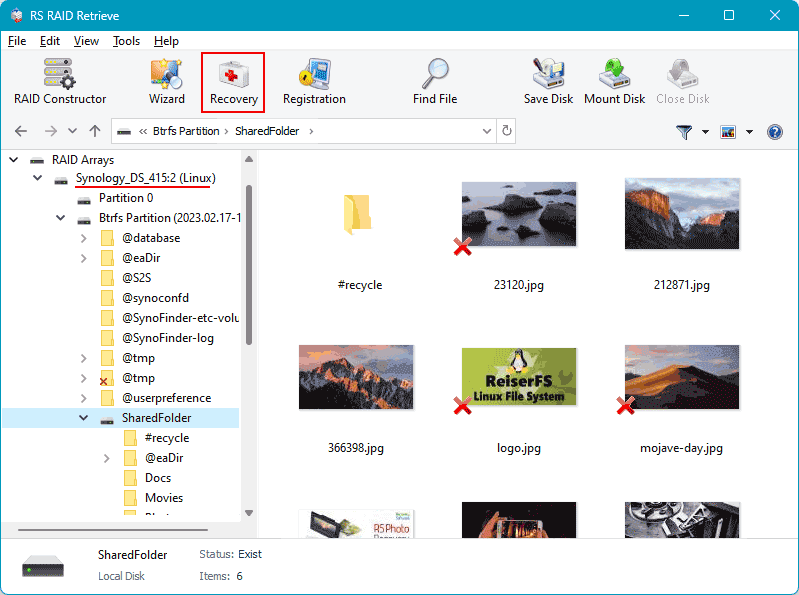
Step 6 Review recovered directories.
Check recovered files—photos, videos, documents—for integrity before exporting. Partial corruption is common in degraded RAID setups.
-
Step 7 Export recovered data carefully.
Save recovered files to a separate physical drive or partition to avoid overwriting the original disks, which could hinder further recovery.
Tip: Do not write any data to the original NAS drives during recovery to protect RAID metadata and filesystem structures from being overwritten.
Why RAID fails in 2-disk NAS Promise Apollo Cloud 2 Duo
RAID failure on a 2-disk Promise Apollo Cloud 2 Duo NAS usually results from a combination of aging hardware, unstable system conditions, and filesystem corruption. Since the two drives are tightly linked, even minor drops in performance or worsening SMART stats can quickly degrade the array. Here are the most common technical causes behind RAID failure that lead to data recovery needs.
1. One disk disappears. A frequent failure scenario involves one drive suddenly vanishing from the NAS interface. This can happen due to firmware bugs in the drive or controller, electrical issues like faulty cables or connectors, or mechanical wear causing the disk to drop offline without warning.
2. Noticeable slowdown. When RAID performance drops—seen as slow file access, reduced throughput, or lag browsing folders—it often means disk synchronization is failing. The system struggles to maintain parity or mirror consistency, which slows responsiveness and speeds up array degradation.
3. “Degraded” or “Crashed Volume” status. The NAS marks the array as Degraded when redundancy is lost and fault tolerance is compromised. Ignoring this can lead to a Crashed Volume, where the array goes offline and professional recovery becomes critical.
4. Files become inaccessible. In RAID 0 or dual-drive failure cases, files may fail to open or return errors like “File Corrupted” or “Directory Unavailable.” This usually points to metadata corruption or bad sectors affecting key filesystem structures.
- Undetected disk dropouts or disconnects causing array inconsistencies
- Parity or mirror sync failures during rebuild attempts
- Sector-level degradation flagged by SMART, causing read/write errors
- Unexpected power loss or shutdowns corrupting RAID metadata and filesystem journals
The main causes of data loss in NAS devices
Disk failure. Physical failures of HDDs or SSDs are still a top cause of data loss, especially in 2-disk NAS setups where RAID0 offers no redundancy and RAID1 relies entirely on the health of each drive. These failures often show up as unreadable sectors or drives dropping offline, pushing arrays into degraded states that make recovery more complex.
Human errors (deletion, formatting). Accidentally deleting important shares or reformatting volumes without a backup happens frequently. Such mistakes can overwrite file system metadata or partition tables, making data inaccessible until specialized recovery methods are applied quickly to prevent further overwriting.
Firmware or DSM update errors. Failed updates to NAS firmware or DiskStation Manager (DSM) can corrupt metadata or RAID configuration data. This usually results in dropped arrays or unreadable partitions, requiring detailed extraction of RAID parameters before any data recovery can proceed.
Power problems and sudden shutdowns. Unexpected power loss during active writes can cause file system corruption or partially written RAID stripes. This damages metadata and may leave arrays degraded or offline, demanding careful reconstruction and file system repair to retrieve data.