As IT has advanced and permeated everyday life, the value of data has reached a new level. RAID technology was developed to prevent data loss; however, in practice even RAID arrays can fail. This article reviews the main causes of failure in RAID 3 and RAID 4 arrays and explains how to recover lost data.
Contents
- How RAID 3 and RAID 4 work
- Differences between RAID 3 and RAID 4
- Causes of data loss on RAID 3 and RAID 4
- What to do if a RAID 3 or RAID 4 array fails
- Comparison with modern RAID levels
- Migrating from RAID 3/4 to modern solutions
How RAID 3 and RAID 4 work
To build a RAID 3 or RAID 4 array, you need at least three disks. This requirement follows from how these arrays operate. Both RAID 3 and RAID 4 use striping (as in RAID 0) plus a dedicated parity disk. Parity is calculated automatically when data is written and stored on the dedicated drive. It is then used during data transfers (moves or copies) to verify integrity. If a failure occurs, missing data is reconstructed using XOR across the remaining disks.
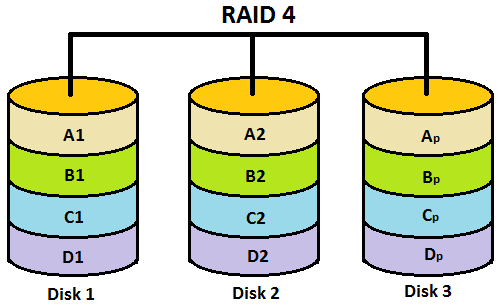
Performance with this organization is noticeably higher than with RAID 1, and the array will continue to operate if a single disk fails. The user will see a warning and a drop in performance. In this case, replace the failed disk immediately, otherwise data may be lost.
Compared with RAID 0 (striping), both RAID 3 and RAID 4 are slower on writes because updating parity on the dedicated disk adds overhead.
Note that RAID 3 and RAID 4 are rarely used today due to poor performance under many concurrent I/O requests. Reads and writes involve all disks in lockstep while parity resides on a single device, creating a bottleneck that limits throughput. RAID 3 and RAID 4 are better suited to sequential workloads such as video streaming, where long transfers occur with minimal I/O concurrency.
Differences between RAID 3 and RAID 4
RAID 3 and RAID 4 are very similar. They share the same structure and minimum disk count, and both use a dedicated parity disk to enable data recovery when needed. The key difference is stripe granularity. RAID 3 stripes at the byte level, while RAID 4 stripes at the block level. Block-level striping can partially mitigate low write performance under concurrent I/O. However, because parity calculation and updates still target a single disk, RAID 3 and RAID 4 are seldom used today. Newer levels deliver higher performance while maintaining strong data protection. For details, see “Types of RAID arrays—Which level should you choose?”.
Causes of data loss on RAID 3 and RAID 4
RAID protects data in the event of a single drive failure, but users can still lose important information for many other reasons. The primary threat to RAID (as with any hardware) is power issues, which can damage multiple drives at once. In this situation, data recovery is difficult because hardware repairs or replacements are required before you can attempt to recover the data. In addition, controllers (both hardware and software) are sensitive to abrupt power loss and voltage spikes. Even replacing a controller with an identical model will not always restore the array. A new controller may be unable to determine the array geometry (start offset, disk order, stripe size) and thus fail to assemble the array correctly. When deploying any RAID level, ensure a reliable UPS is in place to avoid these issues.
Other common causes of RAID 3 and RAID 4 failures include rebuild errors after a reboot. Controllers may fail to rebuild the array due to excessive bad sectors causing errors during reconstruction, incorrect disk connections (often after service), or damaged cables.
Human error is another frequent cause of data loss. Even with a correctly configured array, accidental file deletion, partition formatting, or improper data operations can occur. In such cases, you will need data recovery software. RS RAID Retrieve is an excellent choice due to its simplicity and ability to recover data even in complex scenarios.
Operating system failures can also affect RAID 3 and RAID 4, especially with software RAID, where array operability depends directly on the OS. A system failure will almost certainly leave you with a non-functional RAID array. Hardware controllers are less dependent on the OS but are more expensive, whereas software RAID can be built in almost any OS. For information on how to build a software RAID, see “Software RAID — pros and cons”.
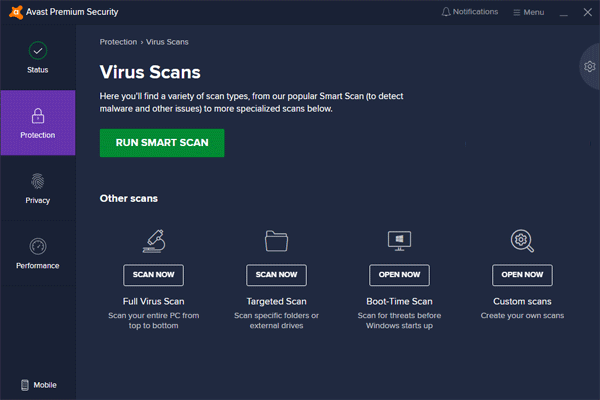
RAID operation can also be disrupted by malware or adware. Malware may delete, corrupt, or render files unreadable, and it can damage the logical structure of disks, which degrades performance or prevents the array from starting. Regularly scan the array for malware using either paid or free tools.
Finally, logical structure corruption on the drives can occur due to controller errors or numerous bad blocks. Your RAID 3 or RAID 4 array may slow down and report disk errors or fail to start at all. We strongly recommend using high-quality components you can trust.
What to do if a RAID 3 or RAID 4 array fails
The health of RAID 3 and RAID 4 arrays largely depends on proper maintenance (monitoring drive health, removing junk to maintain performance, fixing software issues, etc.). Even so, unforeseen events happen. A common scenario is deleting “unnecessary” data only to find it is needed later. Whatever the cause of data loss, it is crucial to act correctly to avoid further damage and to maximize the chance of successful recovery.
First, extract the data from the RAID 3 or RAID 4 array, and only then attempt to restore the array itself.
To do this:
Step 1: Download and install RS RAID Retrieve. Launch the application. The built-in “RAID Builder” will open. Click “Next”.

Data recovery from damaged RAID arrays
Step 2: Choose how to add the RAID array for scanning. RS RAID Retrieve offers three options:
- Automatic mode — simply select the disks the array consisted of, and the program will automatically determine their order, the RAID level, and other parameters.
- Search by controller vendor — select this if you know the vendor of your RAID controller. This option is also automatic and requires no knowledge of the array structure. Providing the vendor speeds up array construction, so it’s faster than the previous option.
- Manual creation — use this if you know which RAID level you used. You can specify any parameters you know, and the program will determine the rest automatically.
After selecting the appropriate option, click “Next”.
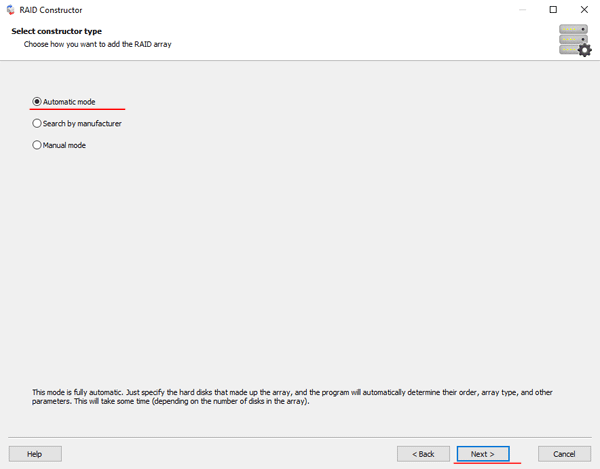
Step 3: Select the disks that made up the RAID array and click “Next”. The program will search for array configurations. When it completes, click “Finish”.
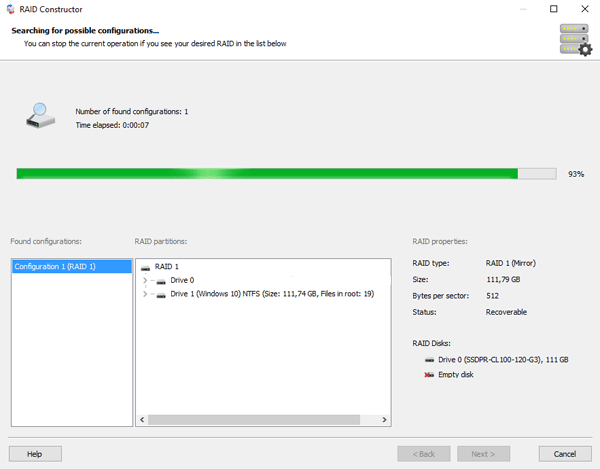
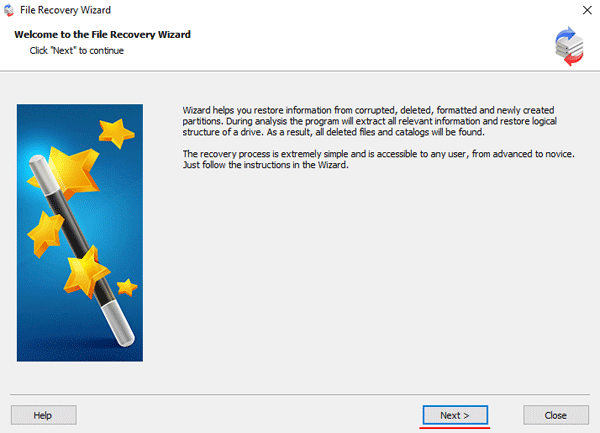
Step 4: After the builder assembles the array, it will appear as a regular drive. Double-click it. The File Recovery Wizard will open. Click “Next”.
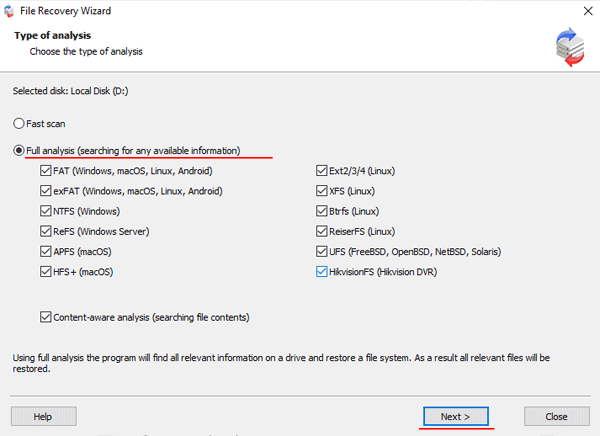
Step 5: RS RAID Retrieve will offer to scan the array for recoverable files. Two options are available: Quick scan and Full analysis. Choose the desired option. Then specify the file system used on your array. If you are not sure, select all available options as shown in the screenshot. RS RAID Retrieve supports all modern file systems.
When everything is set, click “Next”.
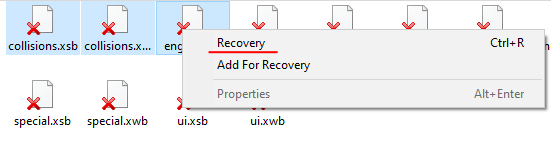
Step 6: The scan will begin. When it completes, you will see the original folder and file structure. Locate the required files, right-click them, and choose “Recover”.
Step 7: Choose where to save the recovered files. This can be a hard drive, a ZIP archive, or an FTP server. Click “Next”.
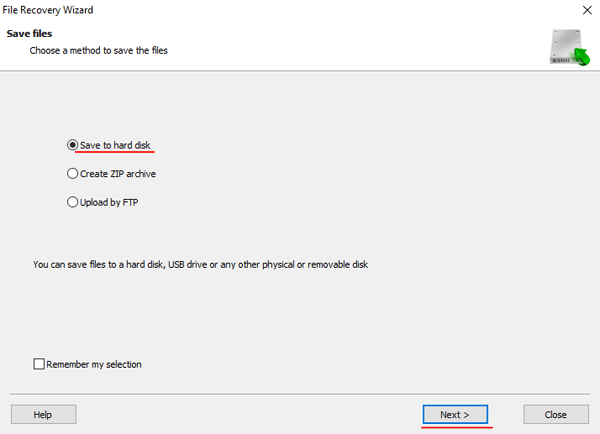
After you click “Next,” the program will start the recovery process. When it finishes, the selected files will be available at the specified location.
Once all files have been successfully recovered, recreate the RAID 3 or RAID 4 array and copy the files back.
As you can see, recovering data from RAID 3 and RAID 4 is straightforward and does not require deep PC knowledge, making RS RAID Retrieve suitable for both professionals and beginners.
Comparison with modern RAID levels
Why RAID 5/6 are preferable
While RAID 3 and RAID 4 were innovative in their time, modern IT systems favor more advanced solutions such as RAID 5 and RAID 6. Here are the main reasons for this shift.
Performance and concurrency
RAID 5 eliminates the main bottleneck of RAID 3/4—the dedicated parity disk. In RAID 5, parity is distributed across all disks, which allows you to:
- Handle multiple read/write requests concurrently
- Use all disks in parallel instead of waiting on a parity disk
- Achieve much higher performance on random I/O
Performance comparison:
- RAID 3/4: Performance can drop 3–5x under concurrent requests
- RAID 5: Performance remains stable even under heavy load
Scalability
RAID 6 goes further by providing dual parity, which means:
- Two simultaneous disk failures can be tolerated without data loss
- Higher reliability for mission-critical systems
- Better protection during array rebuilds
Compatibility with modern hardware
Modern controllers and operating systems are optimized for RAID 5/6:
- Hardware acceleration of parity calculations
- Improved rebuild algorithms
- Support for large-capacity drives (8 TB+)
| Parameter | RAID 3/4 | RAID 5 | RAID 6 |
|---|---|---|---|
| Minimum disks | 3 | 3 | 4 |
| Usable capacity | (n-1)/n | (n-1)/n | (n-2)/n |
| Fault tolerance | 1 disk | 1 disk | 2 disks |
| Write performance | Low | Medium | Medium |
| Read performance | High | High | High |
Migrating from RAID 3/4 to modern solutions
Migrating from legacy RAID 3/4 to modern levels requires careful planning and a phased approach.
Migration strategies
There are two primary strategies, each suited to different scenarios.
Full replacement is the recommended approach, providing maximum performance, modern security features, and full compatibility with new hardware. This method involves creating a complete backup of all data, procuring and testing new hardware in an isolated environment, installing the new RAID controller, creating a RAID 5/6 array, and restoring data from backup. The final stage includes decommissioning the old system, activating the new configuration, and thoroughly verifying data integrity.
Phased migration is better for mission-critical systems with limited downtime. First, connect additional disks to the existing system and create a temporary RAID 5 array. Next, copy data to the new array and verify its integrity. Finally, redirect applications to the new array and remove the old configuration.
After a successful migration from RAID 3/4, you can expect significant performance gains, including 2–4x faster random I/O, a 30–50% reduction in system latency, and improved application performance.