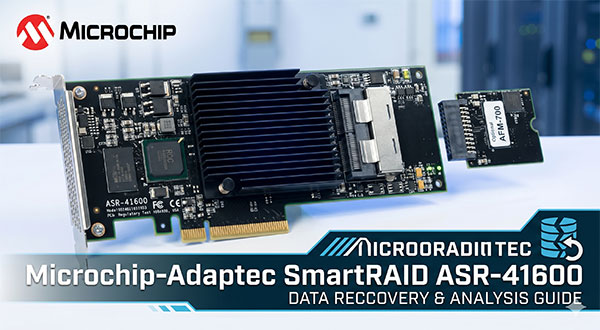
When a Microchip Adaptec SmartRAID ASR-41600 controller fails, the data stored on the RAID array is often still present on the disks. In many cases, the actual problem is not physical data destruction, but the loss of RAID configuration required to assemble the array correctly.
The Microchip Adaptec SmartRAID ASR-41600 is built on the architecture and uses the Legacy AAC-RAID stack. It stores configuration in the COD format, which means access to the array depends on the controller being able to interpret the original RAID parameters correctly. If those parameters become unavailable after a firmware issue, power event, controller replacement, or interrupted rebuild, the operating system may detect the drives individually but fail to mount the RAID volume.
Important: in this type of failure, RAID data recovery is often possible because the data usually remains on the disks. What is lost is the structure needed to reconstruct the array.
Why the RAID Array Becomes Inaccessible
With the Microchip Adaptec SmartRAID ASR-41600, the controller does much more than connect disks. It controls how data is distributed across the array and how the RAID is reconstructed during startup. For RAID 5 and RAID 6, access depends on several parameters matching the original configuration.
Metadata Layout
COD
The controller stores RAID configuration in its own metadata structure. If this metadata becomes damaged or inconsistent, the array may appear missing even when all drives remain healthy.
Data Offset
0 / 1024
This defines where the actual RAID data begins on each disk. A wrong offset prevents correct file-system detection.
Stripe Size
64K - 1M
The stripe size affects how blocks are distributed between drives. If reconstructed incorrectly, files may open with errors or remain unreadable.
Parity Layout
Left-Asynch
Parity logic determines how RAID 5 and RAID 6 reconstruct missing data. An incorrect parity assumption may produce corrupted output.
For this reason, a failed controller often causes what looks like total data loss, while the disks themselves remain readable. This is a common hardware RAID recovery scenario: the system sees the drives, but no longer understands how to rebuild the array.
Management utilities also matter. In this case, the environment is associated with Solaris (arcconf), and mismatches between stored RAID metadata and controller state can leave the array offline, foreign, or uninitialized.
How Cache Problems Can Affect the Array
The Microchip Adaptec SmartRAID ASR-41600 supports cache acceleration and uses the AFM-700 module for cache protection. When this protection layer degrades or stops working properly, the controller may change write behavior. In practice, that can lead to incomplete metadata updates, write inconsistency, or a failed rebuild after an unexpected shutdown.
If the controller reports cache or protection-related issues, avoid rebuild attempts until the drives are checked and the RAID structure is safely analyzed.
Common Causes of RAID Controller Failure and Data Loss
Most cases of lost access to a RAID 5 or RAID 6 array on Microchip Adaptec SmartRAID ASR-41600 happen after a specific event, not at random. The most common causes include:
Power loss during write operations — may leave the COD structure incomplete or inconsistent.
Interrupted or failed rebuild — especially risky for RAID 5 and RAID 6, where parity must remain consistent across all drives.
Controller replacement — a different firmware revision or stack interpretation may prevent the new controller from recognizing the original configuration.
Metadata corruption — damage to COD metadata prevents the controller from assembling the RAID correctly.
Controller instability under load — can affect parity handling, write consistency, and rebuild reliability.
Manual initialization — one of the most dangerous mistakes, because it may overwrite the original RAID metadata.
Technical Specifications of the Microchip Adaptec SmartRAID ASR-41600
| Drive Bays | 4 |
|---|---|
| RAID Levels | 0, 1, 5, 6 |
| Architecture (ROC) | PM8063 |
| Generation / Stack | Legacy AAC-RAID |
| Metadata Format | COD |
| Typical Data Offset | 0 / 1024 |
| Stripe Size Range | 64K - 1M |
| Parity Rotation | Left-Asynch |
| Cache Protection | ✓ |
| HBA / RAID Modes | BIOS Switch |
| Processor (ROC) | SmartROC |
| Management OS / GUI | Solaris (arcconf) |
A Frequent SmartRAID ASR-41600 Failure Scenario
One recurring issue seen with Microchip Adaptec SmartRAID ASR-41600 is loss of array recognition after controller migration or firmware changes. The disks remain readable, but the stored COD configuration may be flagged as foreign or interpreted inconsistently by the controller.
In practice, the array may appear offline even though no member disks have failed. This can happen after moving disks to another adapter, applying firmware updates, or importing an older configuration through Solaris (arcconf).
Because this controller relies on the Legacy AAC-RAID stack, metadata interpretation can be sensitive to controller state. In these situations, many users mistakenly attempt initialization or force a rebuild, which may worsen the problem.
If a SmartRAID ASR-41600 array suddenly appears as foreign after a controller event, treat it first as a metadata problem, not a failed RAID. In many cases, the data can still be recovered.
AFM-700 Cache Protection Problems
Another issue sometimes seen on this controller involves the AFM-700 cache protection module. If the module degrades or enters an error state, write operations may be committed inconsistently during heavy load or unexpected shutdown.
This can lead to damaged metadata updates, failed rebuild attempts, or a RAID volume that mounts with structural errors even though the disks themselves remain healthy.
Do Not Initialize the Array
If the operating system or controller utility suggests initializing the RAID, do not confirm it. Initialization can overwrite the original COD data and significantly reduce the chances of successful RAID data recovery.
Recovering RAID 5 or RAID 6 After RAID Controller Failure
Recovering data from RAID 5 or RAID 6 after controller failure is often possible because user data usually remains distributed across the disks. The real challenge is reconstructing the array with the same parameters used before the failure.
For a Microchip Adaptec SmartRAID ASR-41600 configuration, recovery depends on identifying the correct 0 / 1024, stripe geometry, and Left-Asynch. In RAID 5, one parity mismatch may produce corrupted output. In RAID 6, the situation is even more sensitive because dual-parity reconstruction leaves less room for error.
This is why manual RAID reconstruction is time-consuming and risky. Even if the array appears to assemble, incorrect parameters may result in damaged documents, broken databases, unreadable virtual disks, or media files that only open partially.
Typical Scenario: Controller Replaced, RAID Still Offline
A failed Microchip Adaptec SmartRAID ASR-41600 controller is replaced with another unit of the same model, but the RAID remains offline or appears as foreign. The disks are healthy, yet the new controller does not reconstruct the original array correctly because the stored configuration is interpreted differently or the metadata is already damaged.
In this situation, RAID recovery software is often the safer approach because it works with the disks directly instead of depending on the controller to rebuild the array first.
Step-by-Step Guide to Recover Data
Recovering data from a RAID array connected through Microchip Adaptec SmartRAID ASR-41600 is possible even after RAID corruption, controller failure, metadata damage, or rebuild problems.
-
Step 1 Power off the server and disconnect the RAID disks.
Remove all member drives and preserve their original order.
-
Step 2 Connect all drives to a Windows PC.
All drives should be visible to the system at the same time for accurate RAID assembly.
-
Step 3 Launch the RAID recovery software.
Open RS RAID Retrieve. The program analyzes the disks and attempts automatic RAID reconstruction.

Data recovery from damaged RAID arrays
Available for: Windows, macOS, Linux -
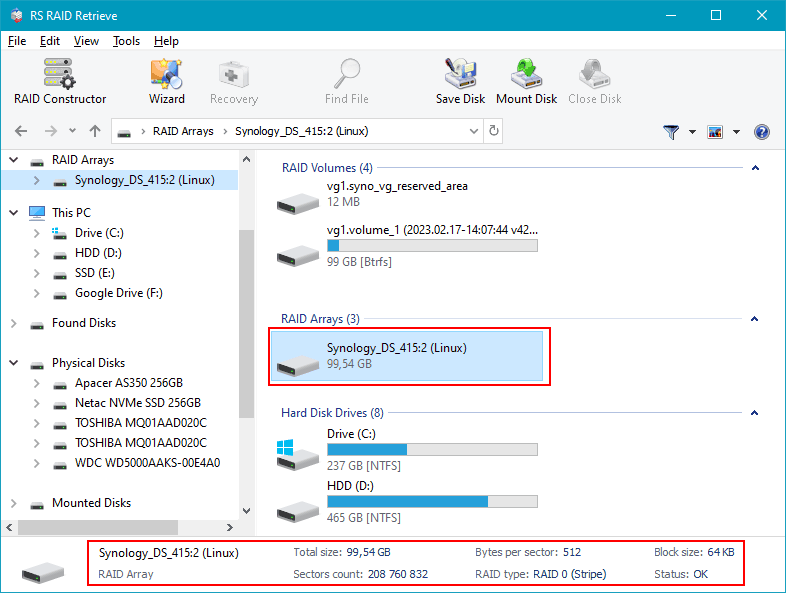
Step 4 Verify detected RAID parameters.
Check the detected RAID level, offset, stripe size and parity layout.
-
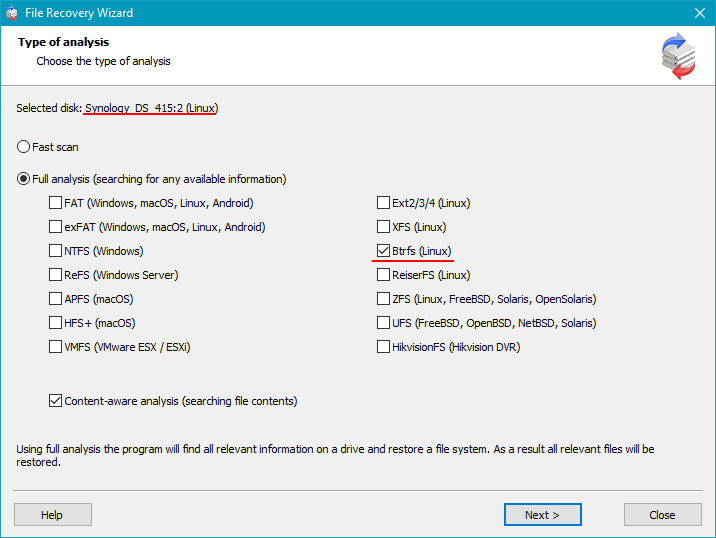
Step 5 Run a full scan.
The software rebuilds the file system structure and searches for lost or corrupted files.
-
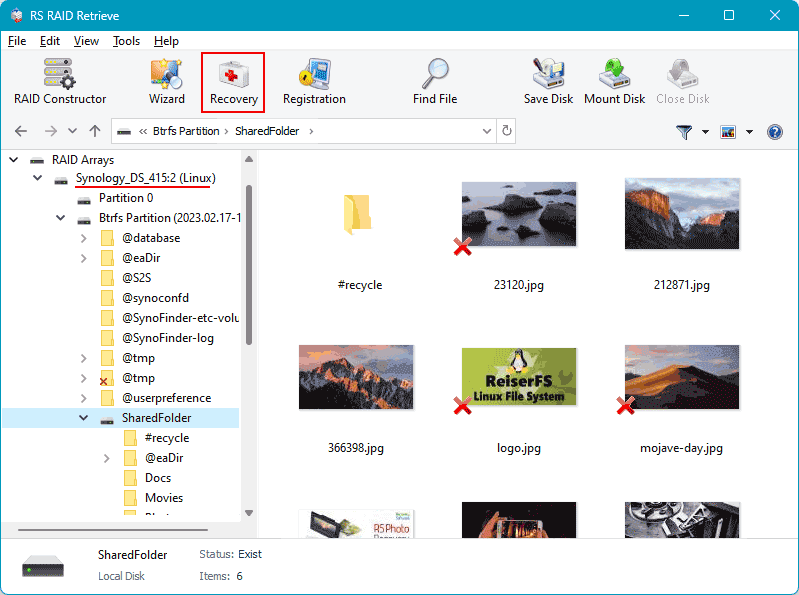
Step 6 Review the recovered files.
Preview recovered data before exporting.
-
Step 7 Save recovered data to another storage device.
Do not export files back to the original source drives.
Tip: Never write new data to the original RAID disks during recovery.
Why RS RAID Retrieve Is Safer Than Manual RAID Reconstruction
Manual recovery of a failed hardware RAID usually means testing different parameter combinations until the array becomes readable. With RAID 5 and RAID 6, that process is slow and error-prone.
RS RAID Retrieve analyzes the disks directly and helps recover data from RAID arrays even after controller failure, metadata corruption, or a failed rebuild.
RS RAID Retrieve can help recover data from a failed Microchip Adaptec SmartRAID ASR-41600 array by identifying RAID parameters, reconstructing the virtual array, scanning the file system, and exporting recovered files to safe storage.
Conclusion
A Microchip-Adaptec SmartRAID ASR-41600 failure does not automatically mean the data is gone. In many cases, the disks still contain the full file structure, but the system can no longer reconstruct the RAID correctly because the controller configuration is unavailable or damaged.
If the array used RAID 5 or RAID 6, successful recovery depends on identifying the original parameters and avoiding destructive actions such as initialization or repeated rebuild attempts. With the right RAID recovery software, it is often possible to recover data from RAID safely and restore access to important files.