A failing RAID array on NAS Promise Pegasus J2-512G can instantly make the entire storage pool inaccessible. RAID 1 mirror inconsistencies, metadata corruption, failed resync operations, or unexpected disk dropouts are common triggers for data loss. In this article, we outline the most frequent RAID-related issues affecting the NAS Promise Pegasus J2-512G and explain how to recover data safely without risking overwriting or additional damage.

Key NAS Specifications That Ensure Reliability and Data Protection
The Promise Pegasus J2-512G NAS combines performance, security, and convenience in a compact solution designed for home offices and professionals. With 2 drive bays, it supports RAID 0/1 configurations, allowing you to choose between faster performance or improved data protection. Its modern EXT4 and Btrfs file systems offer advanced stability, while seamless network integration ensures quick access to your files from any device.
If the unexpected happens — disk failure, corruption, or accidental deletion — the system’s well-structured RAID architecture makes data recovery fast and highly effective using specialized tools.
Technical Specifics of Data Recovery on Promise Pegasus J2-512G
Data recovery on the Promise Pegasus J2-512G requires understanding of its dual-bay architecture and RAID metadata layout. RAID 0 stripes are distributed in fixed-size blocks, while RAID 1 mirrors maintain identical superblocks across disks. The device typically utilizes EXT4 or Btrfs, each with its own journal and tree-structure constraints. During recovery, drives must be imaged sector-by-sector to prevent metadata corruption, and RAID parameters (chunk size, order, layout) must be reconstructed manually or via specialized tools.
Main Features of the Promise Pegasus J2-512G NAS
| Drive Bays | Supported Drives | Hot Swappable | Supported RAID | File Systems | Maximum volume |
| 2 | 2.5" or 3.5" SATA | ✗ | RAID 0, RAID 1, JBOD | HFS+, APFS | 512 Tb |
The device is a Portable DAS with No OS and a dedicated Hardware RAID Controller that can present arrays as RAID 1 (alternatively RAID 0 or JBOD) and employs an SSD cache. In this architecture the controller is the single aggregation point: it exposes block devices formatted as HFS+ or APFS to hosts and manages mirroring and cache coherency. The most probable model-specific failure point is the controller itself, because loss of controller function removes the aggregation and cache logic that presents the mirrored volume to any attached host.
When the controller fails the host no longer sees the logical volume even though mirrored physical media may contain intact copies; logical inaccessibility follows from the controller holding the mapping and cache state necessary to present a consistent HFS+/APFS filesystem. Recovery outside the unit therefore requires bypassing the controller: acquire raw images of the physical media, reconcile any SSD cache-related coherency differences that could leave recent writes only in cache, and mount or repair the recovered HFS+/APFS image on a host that supports those filesystems to restore logical access.
Step-by-Step NAS Promise Pegasus J2-512G Data Recovery Guide
When your 2-disk NAS Promise Pegasus J2-512G stops responding — whether after a RAID failure, file-system corruption, accidental deletion or power loss — the situation feels urgent. This guide is built to reduce cognitive load and help you move through recovery with clarity. Every step is actionable, simplified, and aligned with best practices used by data-recovery professionals.
-
Step 1 Power down your NAS Pegasus J2-512G and remove the drives.
Shut the device down completely. Slide out both disks carefully and label them “Disk 1” / “Disk 2” to preserve array order — a critical UX-safe detail for accurate RAID reconstruction.
-
Step 2 Connect both drives to your computer.
Use SATA ports or adapters. Ensure both disks are mounted simultaneously; the software needs full access to rebuild the RAID architecture correctly.
-
Step 3 Launch RS RAID Retrieve.
The interface guides you through detection, RAID auto-assembly, and scan options. The preview panel displays configuration details so you can validate the restored RAID layout before scanning.

Data recovery from damaged RAID arrays
Available for: Windows, macOS, Linux -
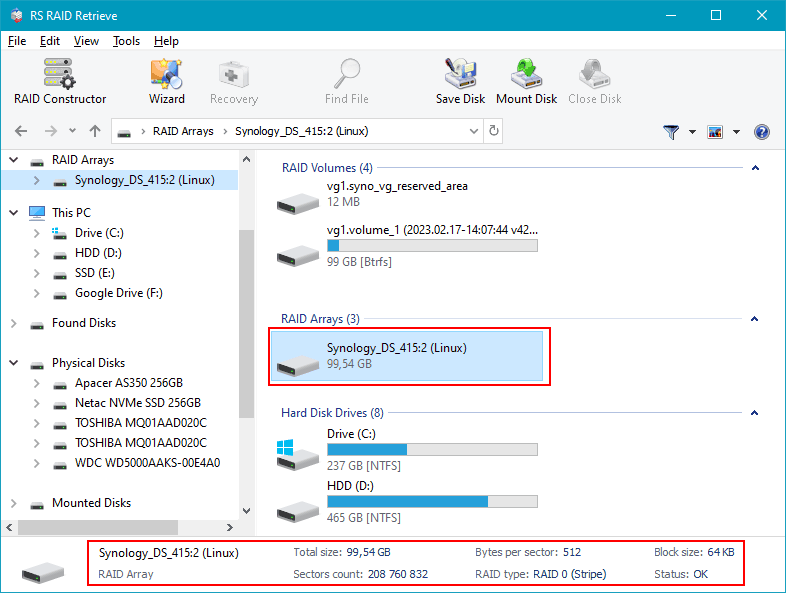
Step 4 Verify RAID parameters.
The tool usually identifies stripe order, block size, and RAID type automatically. If not, you can adjust settings manually with real-time feedback in the UI.
-
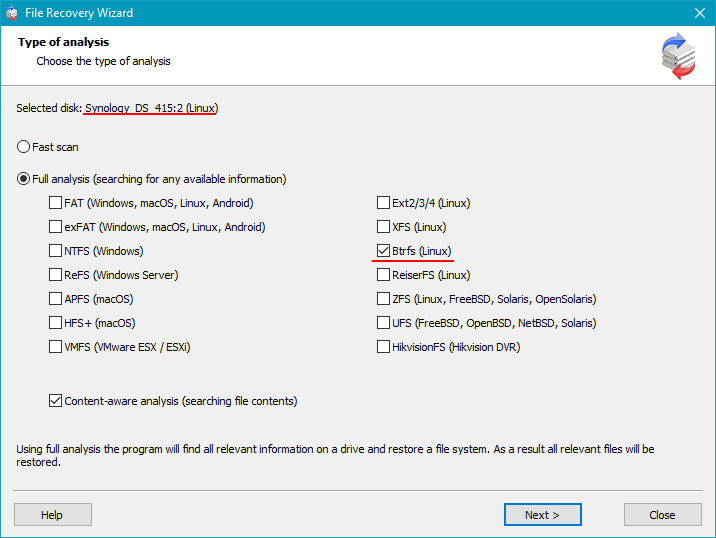
Step 5 Run a deep scan.
The algorithm reconstructs folders, recovers deleted items, and restores media metadata for photos, videos, documents, and more.
-
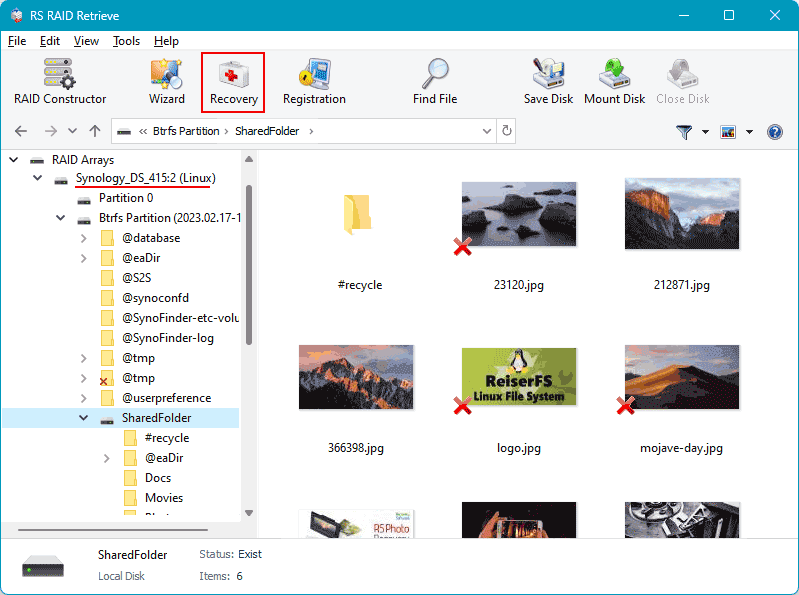
Step 6 Review the tree structure.
Explore the recovered directory: thumbnails, file types, timestamps — everything is organized for intuitive navigation.
-
Step 7 Export your files.
Select any safe storage location — external HDD, SSD, or a separate partition. Avoid writing anything back to the original drives.
Tip: Keep the recovered data on a new device to prevent overwriting and ensure maximum recovery success.
Why RAID Fails in NAS Promise Pegasus J2-512G
When a NAS Promise Pegasus J2-512G with two drives starts acting strangely, it usually hints at deeper RAID issues. UX-focused diagnostics show that users often notice early signals long before an actual failure — and recognizing these patterns helps protect data before it’s too late.
Drive desynchronization over time. Even if both disks seem healthy, subtle delays in read/write tasks gradually break RAID harmony. These small inconsistencies accumulate and eventually cause degraded status.
Hidden disk wear. A 2-bay NAS relies on perfect cooperation between drives. But sectors fail silently: the NAS keeps running, performance drops, and users start experiencing delays while opening or copying files.
Thermal imbalance. Many RAID failures originate from simple overheating. If the enclosure can’t maintain airflow, one disk ages faster, leading to mismatched performance that threatens the whole RAID.
Firmware conflicts. Different firmware versions between drives or outdated NAS OS can cause synchronization failures, unexpected rebuild loops, or forced RAID degradation.
- early disk dropouts
- slower file access or freezing directories
- repeated “Degraded” notifications from the NAS interface
File access disruption. When RAID 0 fails — or when both drives show errors at once — files become unreadable or completely inaccessible, triggering urgent data recovery.
Common Causes of Data Loss in NAS Devices
Data loss in NAS systems often occurs due to RAID failures, accidental deletion, firmware corruption, disk degradation, and power outages. Misconfigured RAID arrays or simultaneous disk failures also frequently lead to inaccessible volumes or damaged file structures.