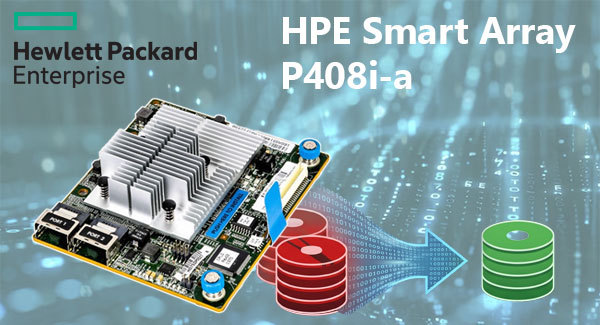
Failure of a HPE Smart Array P408i-a controller does not imply immediate loss of user data. In many scenarios, the underlying member disks retain intact blocks, while the inaccessible state is caused by missing or corrupted RAID definition data. RAID recovery therefore depends on reconstruction of operational parameters rather than direct file restoration at the first stage.
The HPE Smart Array P408i-a platform built on with the Smart Storage stack records array state in RIS. If metadata interpretation fails due to firmware inconsistency, power interruption, controller migration, or aborted rebuild, the host may enumerate drives individually without assembling the logical volume. In this condition, engineers typically reconstruct stripe logic and metadata relationships to recover data from RAID array safely.
Important: inaccessible arrays under this failure model frequently indicate parameter loss, not immediate data destruction.
Why the RAID Array Becomes Inaccessible
The HPE Smart Array P408i-a depends on coordinated values including RIS, 1024, 64K - 256K, and Right-Asynch. For RAID 5/6, logical reconstruction fails if these parameters are interpreted incorrectly.
Metadata Layout
RIS
Stores RAID definition and operational relationships.
Data Offset
1024
Defines start location of array data.
Stripe Size
64K - 256K
Controls inter-disk data distribution.
Parity Layout
Right-Asynch
Determines parity rotation logic.
This is a classic RAID recovery scenario in which the logical volume is inaccessible although member disks remain readable.
Controller-management interaction through Win/Lin (ssacli) can further contribute to foreign or uninitialized states.
How Cache Problems Can Affect the Array
The Smart Battery subsystem affects write caching behavior. Degraded cache protection can introduce inconsistent metadata commits and rebuild instability.
Avoid forcing rebuilds when cache protection warnings are present.
Common Causes of RAID Controller Failure and Data Loss
Failure scenarios affecting HPE Smart Array P408i-a arrays typically arise from parameter inconsistency, interrupted operations, or metadata-level faults rather than spontaneous media loss. Frequent causes in RAID data recovery cases include:
Power-loss events — incomplete commits in RIS.
Failed rebuild sequences — degraded parity state.
Controller migration — incompatible stack interpretation.
Metadata corruption — disrupted array definition.
Thermal or load instability — impacts write integrity.
Manual initialization — may overwrite reconstructive markers.
Technical Specifications of the HPE Smart Array P408i-a
| Drive Bays | 8 |
|---|---|
| RAID Levels | 0, 1, 5, 6, 10 |
| Architecture (ROC) | |
| Generation / Stack | Smart Storage |
| Metadata Format | RIS |
| Typical Data Offset | 1024 |
| Stripe Size Range | 64K - 256K |
| Parity Rotation | Right-Asynch |
| Cache Protection | ✗ |
| HBA / RAID Modes | SSA Utility |
| Processor (ROC) | PM8205 |
| Management OS / GUI | Win/Lin (ssacli) |
Recovering RAID 5 or RAID 6 After RAID Controller Failure
Recovery of RAID 5 and RAID 6 after controller failure depends on accurate reconstruction of logical array parameters. Data blocks often remain intact, while access is lost due to structural interpretation failure.
For HPE Smart Array P408i-a, key variables include 1024, stripe geometry, and Right-Asynch. Misinterpretation at any of these levels can produce invalid output.
Manual reconstruction therefore carries operational risk, particularly in dual-parity environments.
Typical Scenario: Controller Replaced, RAID Still Offline
A same-model replacement may still fail if metadata interpretation differs.
Direct disk-level RAID recovery is often preferred when controller-based assembly is unreliable.
Step-by-Step Guide to Recover Data
RAID recovery from HPE Smart Array P408i-a typically involves controlled reconstruction followed by file-system analysis.
Step 1 Power down the host.
Preserve member-disk sequence.
Step 2 Connect all drives to Windows.
Concurrent visibility is required.
Step 3 Launch RS RAID Retrieve.
Initiate automatic assembly detection.

Data recovery from damaged RAID arrays
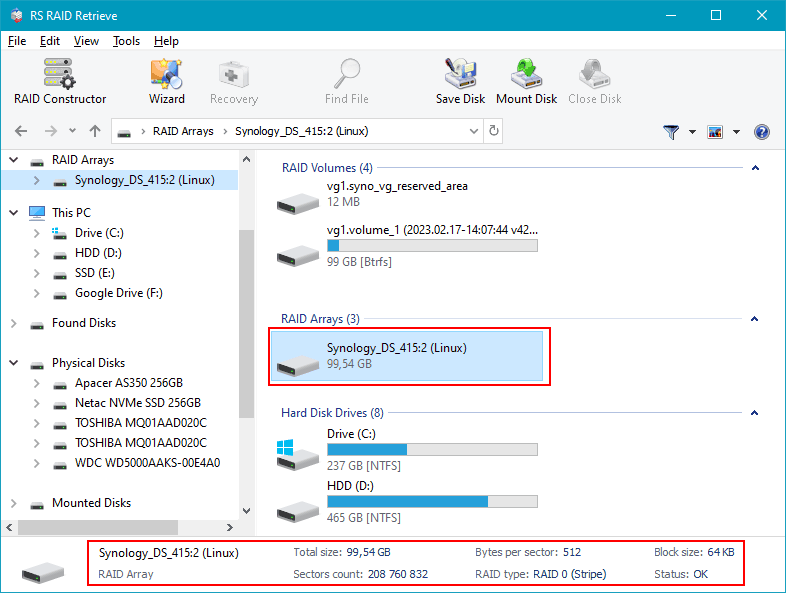
Available for: Windows, macOS, LinuxStep 4 Validate parameters.
Verify offset, stripe size, parity.
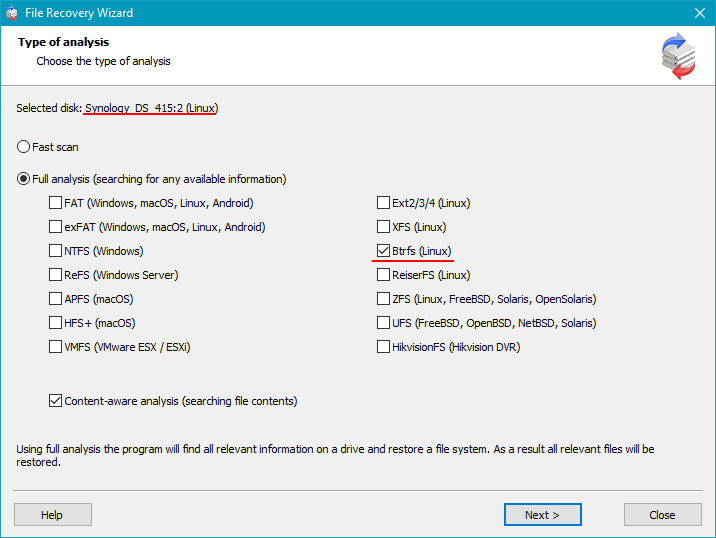
Step 5 Execute full scan.
Reconstruct file-system structures.
Step 6 Validate recovered objects.
Use preview for integrity checks.
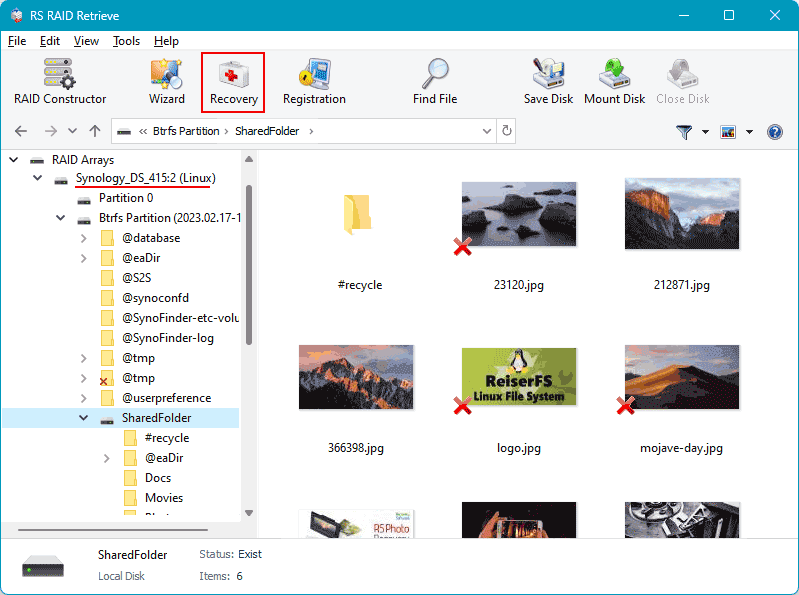
Step 7 Export externally.
Do not target source media.
Tip: Avoid writes to source members.
Why RS RAID Retrieve Is Safer Than Manual RAID Reconstruction
Manual RAID reconstruction often requires iterative parameter validation and carries elevated risk in RAID 5 and RAID 6 environments.
RS RAID Retrieve performs disk-level analysis, virtual reconstruction, and structured RAID recovery workflows without relying on repeated manual reassembly attempts.
The software can identify RAID parameters, reconstruct a virtual array, analyze the file system, and export validated recovery results.
Conclusion
Failure of HPE Smart Array P408i-a does not necessarily imply media-level data loss. In many cases, member disks retain intact structures while access is lost due to configuration failure.
Recovery in RAID 5 and RAID 6 environments depends on accurate parameter reconstruction and disciplined avoidance of destructive operations. Structured RAID recovery workflows can often restore access.