

Photo Recovery Software for Flash Drives, SD Cards and Hard Drives
Recover deleted photos from USB flash drives, formatted SD cards and crashed hard drives. A step-by-step wizard walks you through the whole process.
Why Use RS Photo Recovery to Recover Deleted Photos?
Professional file recovery and image reconstruction algorithms in a simple shell that anyone can use.
Thumbnail Navigation and Instant Preview
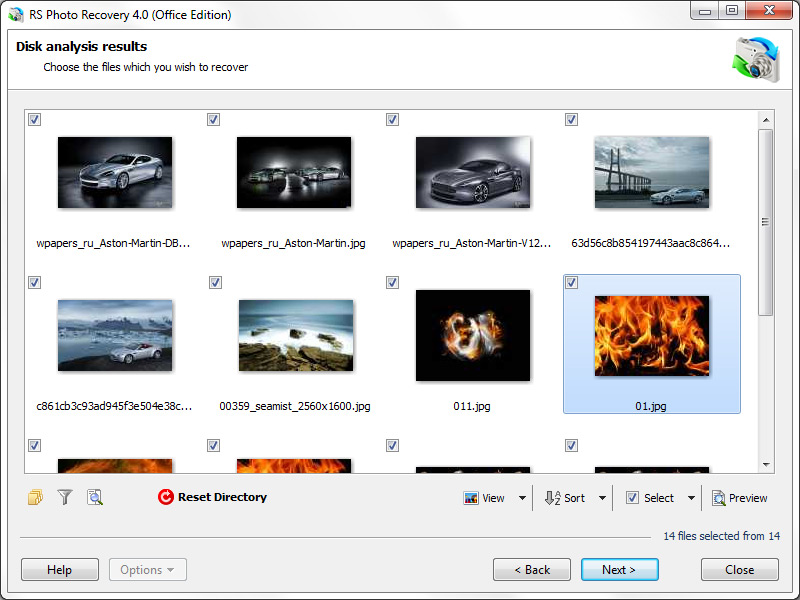
Browse lost and deleted pictures as if they were in a normal photo album. Large thumbnails show which images are still recoverable, and a full-size preview opens for any selected picture.
Content-Aware Analysis
When file system data is no longer available, the program searches the entire disk or memory card for known image and camera RAW signatures and analyzes the header to get the exact location and length of each picture.
Flash Drives, SD Cards and Disks with Any File System
Pictures removed from the Recycle Bin, or lost on a formatted USB flash drive, crashed memory card or repartitioned disk, can be recovered. Corrupted or deleted partitions are supported on all file systems the program works with.
Create and Use Disk Images
Create a bit-precise image of a disk, flash drive or memory card, then mount a simple image (.img, .dsk) and recover from it instead of the physical drive. The original media is not stressed by repeated reads.
Read-Only Safe Mode
The program only reads the source flash drive, memory card or disk and never writes to it. Recovered photos are saved to a different location, so the original media stays unchanged.
Step-by-Step Recovery Wizard
The wizard guides you from choosing a drive to saving the recovered photos. No technical knowledge is required to recover deleted pictures.
Preview Deleted Photos Before You Recover Them
Recoverable pictures appear as thumbnails. Open a full-size preview, select what you need and save it.
How to Recover Photos with RS Photo Recovery
The wizard guides you through the entire process. No technical knowledge required.
Select the Source
Choose a USB flash drive, SD card, hard drive, SSD or a disk image (.img, .dsk).
Scan
Run Fast Scan or Full Analysis. If file system data is gone, content-aware analysis searches for image signatures.
Preview and Select
Browse thumbnails, open a full-size preview and mark the photos to recover.
Save
Save to a different drive, burn to CD/DVD or upload to an FTP server.
Fast Scan, Full Analysis and Content-Aware Analysis
Three ways to find photos, from recently deleted files to media with no file system left.
Fast Scan
Quickly lists recently deleted photos, such as pictures removed from a flash drive, SD card or the Recycle Bin.
Full Analysis
Analyzes the storage after formatting, partition loss or file system corruption, and when a volume becomes RAW or inaccessible.
Content-Aware Analysis
Searches for known image and camera RAW signatures when file system metadata is gone. Files found only this way may not keep original filenames, folder paths or timestamps.
Photo Recovery Tools: Filters, Organized Results and Read-Only Mode
Find the right pictures faster and keep the flash drive, card or disk untouched.
Filter by File Type
Show only the formats you need, such as JPEG or camera RAW, among all found files.
Filter by Date & Size
Narrow the results by file date and size to reach the right photos sooner.
Organized Recovery Results
Found pictures are organized for navigation, so long result lists stay manageable.
Save Analysis and Resume Later
Save the analysis results and continue recovery later without repeating the complete scan of the storage device.
Recover JPEG, RAW and 60+ Photo and Image Formats
Pre-recovery preview and content-aware analysis are available for all supported images and RAW files.
40+ Image Formats
JPEG (JPG, JPE, JPEG), PNG, GIF, BMP, TIFF, PSD, TGA, PCX and more
30+ Camera RAW Formats
CR2, CRW, NEF, ARW, SR2, SRF, ORF, PEF, RAF, DNG, 3FR, X3F and more
Full RAW Support
Canon, Nikon, Sony, Olympus, Pentax, Fujifilm, Hasselblad, Kodak, Leaf, Minolta, Mamiya, Sigma and many other cameras
Show all supported file extensions
Images
RAW files
Supported Flash Drives, Memory Cards, File Systems and OS
Tested with fixed and removable media of all makes and models, including USB flash drives.
Storage Media
- Internal and external hard drives, desktop and laptop
- SSD drives, including TRIM
- USB flash drives, pen drives and removable SSDs
- SD, SDHC, SDXC, Compact Flash, Memory Stick, xD, MMC
- Digital compact cameras and media players via USB
File Systems
- NTFS, ReFS, FAT 16/32, exFAT
- APFS, HFS, HFS+
- Ext2/3/4, Btrfs, ZFS
- UFS, XFS, ReiserFS
Operating Systems
- Windows XP through Windows 11, Server 2003/2008
- macOS 10.12 Sierra – macOS 15 Sequoia, OS X 10.7 – 10.11
- Ubuntu, Debian, Fedora, Linux Mint, openSUSE, Arch Linux
Photo Recovery Scenarios: Deleted, Formatted, Lost or Corrupted
From a single deleted photo to a failed flash drive or disk: the typical situations the program is built for.
Accidentally Deleted Photos
Pictures deleted by mistake from a computer, camera or memory card are listed with thumbnails, so you can find and restore them.
Emptied Recycle Bin or Trash
Photos removed from the Recycle Bin or Trash can be located by scanning the disk.
Formatted SD Cards and Flash Drives
Content-aware analysis finds pictures on formatted SD cards, USB flash drives and disks by their file signatures.
Deleted or Lost Partitions
Recovers pictures from deleted, repartitioned or corrupted partitions on all supported file systems.
RAW, Corrupted or Inaccessible Flash Drives and Disks
Flash drives and disks that show as RAW, ask to be formatted or cannot be opened can be scanned without formatting them.
File System Damage and System Failures
After file system damage or a system failure, the program reads the media directly and finds the pictures that remain.
Recover Deleted Photos from Your Drive
Download the free version and preview your lost pictures before you buy.
✓ 30-day money-back guarantee | ✓ Secure payment | ✓ 24/7 support
Photo Recovery Guides
Articles on recovering pictures from flash drives, memory cards and disks.
How to recover deleted photos from a memory card
Step-by-step recovery of deleted pictures from SD and other memory cards.
Read the guideRecover deleted files from USB flash drive
Find and restore files deleted from a USB flash drive.
Read the guideRecovering a USB Drive After Failed Formatting
What to do when formatting a flash drive did not finish.
Read the guideHow to fix the RAW flash drive?
Get photos back from a flash drive that shows the RAW file system.
Read the guideHow to restore files and folders after deleting them to Recycle Bin and cleaning it out
Recover pictures after the Recycle Bin was emptied.
Read the guideOther Data Recovery Software
RS Partition Recovery
Restore data from formatted hard drives and recover deleted files.
Find out howFrequently Asked Questions
RS Photo Recovery can recover all popular image formats.
Such as: JPEG, JPG, PNG, BMP, GIF, RAW, PSD, CR2, CRW, CDR, BMP, TIFF (TIF), NEF, PEF, X3F and others.
Download the program for free, analyze the storage.
The program will find and display images that can be recovered.
Built-in preview lets you verify the quality images.
By purchasing the program, you get the opportunity to save the recovered data.
Yes, you can.
One of the reasons may be damage to the file structure of the flash drive.
RS Photo Recovery can recover photos from a damaged memory card.
- Connect the memory card to the computer. The card must be determined.
- Launch RS Photo Recovery and start analysis.
One of the reasons may be corruption of data containing information about the photos.
- Use content-aware analysis to find deleted images by content.
- Use RS File Repair to repair damaged photos based on residual information.
Yes, it is possible. RS Photo Recovery can recover photos from a damaged memory card.
- Connect the memory stick to your computer. The card must be detected.
- Launch RS Photo Recovery software and start the analysis.
This greatly depends on the capacity of your hard drive and your computer's performance. Basically, most of hard disk recovery operations can be performed in about 3-12 hours HDD 1TB in normal conditions.
Please use free versions of programs with which you can analyze the storage and view the files available for recovery.
You can save them after purchasing the program - you won't need to scan it again.
