

Professional Data Recovery Software - Files, Partitions & Disks
Recover deleted files, lost partitions, and data from formatted or corrupted drives with advanced deep scan technology
📁
File Recovery
💾
Partition Recovery
🔍
Deep Scan
🛡️
100% Safe
500+
File Types Recovered
15+
File Systems
100%
Safe Recovery
24/7
Expert Support
Complete Data Recovery Solution
One software for all your data recovery needs - files, partitions, and formatted disks
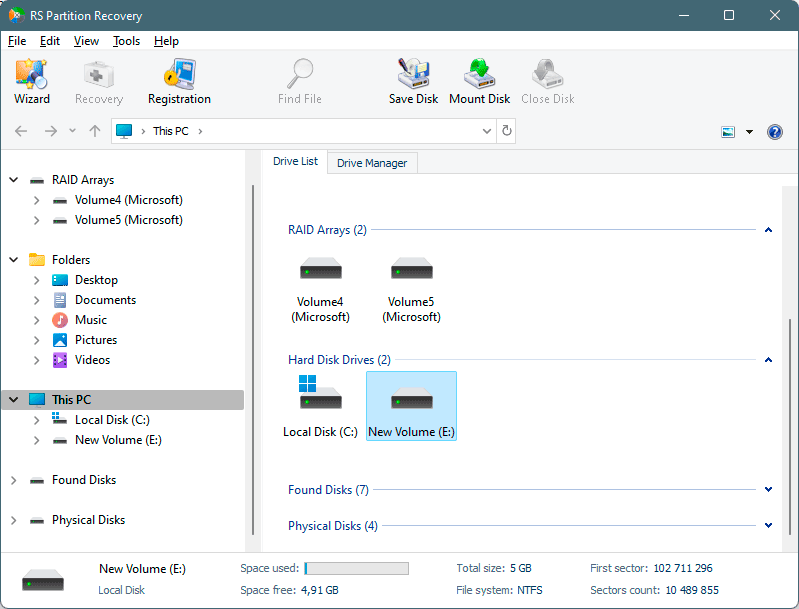
Deleted File Recovery
Recover files deleted from Recycle Bin, using Shift+Delete, or removed by applications. Supports documents, photos, videos, archives, and 500+ file types.
✓ Works after emptying Recycle Bin
Lost Partition Recovery
Recover entire partitions deleted accidentally or lost due to disk repartitioning. Reconstructs MBR and GPT partition tables with all data intact.
✓ Finds partitions after diskpart clean
Formatted Drive Recovery
Restore data from quick or full formatted drives. Works even after multiple formats or conversion between file systems (NTFS to FAT32, etc.).
✓ Post-format data extraction
Deep Scan Technology
Advanced sector-by-sector analysis finds files even when file system is completely destroyed. Recognizes file signatures for 500+ file types.
✓ Finds files others miss
RAW & Corrupted Disk Recovery
Access data from RAW or corrupted disks showing "not formatted" error. Recover files without formatting the drive or reinstalling operating system.
✓ No format required
100% Safe Recovery
Read-only operations ensure your original data remains untouched. Preview files before recovery. No write operations to source disk.
✓ Risk-free process
Recover 500+ File Types from Any Device
Universal file recovery from hard drives, USB drives, memory cards, and more
Documents
Microsoft Office (DOC, DOCX, XLS, XLSX, PPT, PPTX), PDF, TXT, RTF, ODT, Pages
Images & Photos
JPG, PNG, GIF, BMP, TIFF, RAW (CR2, NEF, ARW), PSD, AI, SVG, WEBP
Videos
MP4, AVI, MOV, MKV, WMV, FLV, MPEG, 3GP, WebM, VOB, M4V
Audio Files
MP3, WAV, FLAC, AAC, OGG, M4A, WMA, AIFF, APE, ALAC
Archives
ZIP, RAR, 7Z, TAR, GZ, ISO, DMG, BZ2, XZ, CAB
Emails
PST, OST, EML, MSG, MBOX, DBX, Outlook, Thunderbird
Code & Web
HTML, CSS, JS, PHP, Python, Java, C++, XML, JSON, SQL
Databases
MDB, ACCDB, DBF, SQLite, MySQL dumps, SQL Server backups
Data Recovery from All File Systems
Windows, macOS, Linux, and Unix file system support
Advanced Data Recovery Tools
Professional features for complex recovery scenarios
File Signature Analysis
Recognizes 500+ file types by internal structure, not file extension. Recovers files even when file names and extensions are lost.
Folder Structure Recovery
Restores original folder hierarchy and file names. Maintains directory tree structure from before deletion or formatting.
File Preview
Preview documents, images, videos, and archives before recovery. Verify file integrity without saving files first.
Disk Imaging
Create sector-by-sector disk images for safe recovery. Work with image files instead of risking physical disk damage.
Hex Viewer
Built-in hex viewer for manual data analysis. Examine file structures, partition tables, and boot sectors at byte level.
Network Export
Save recovered files directly to FTP servers, network shares, or cloud storage. No need for local storage space.
Search & Filter
Search files by name, extension, size, or date. Apply filters to quickly locate specific documents in large scan results.
Quick Scan Mode
Fast analysis finds recently deleted files in minutes. Scans file system metadata before deep sector scan.
Read-Only Mode
All operations are read-only. Your original disk remains unchanged during entire recovery process. 100% safe.
Remote SSH Access
Connect over SSH to a remote NAS, server, or VMware ESXi host and analyze its disks without removing them. The remote storage is detected as a regular disk, so you can scan and recover data directly over the network. Available in the Windows, macOS, and Linux versions of RS Partition Recovery.
SMART Disk Health Monitor
Check a drive's condition before starting recovery. The program displays the full SMART attribute table (current and threshold values for every parameter), real-time temperature, and an overall health status — Good, Caution, or Bad. Available on Windows, macOS, and Linux.
Forensic Image Support
Mount and work directly with forensic image formats: EnCase/EWF (E01, S01, Ex01), Advanced Forensic Format (AFF, AFM, AFD), and AFF4 — as a single file, multi-volume set, or folder. Common compression schemes are supported.
VMware vSphere
Hyper-V
VirtualBox
QEMU/KVM
VMFS 5/6
Parallels
XenServer
Proxmox
VMDK Recovery
VMware virtual disks. Thick/thin provisioned. ESXi datastores. Extract files from VMDK without vSphere.
VHD/VHDX Recovery
Hyper-V virtual hard disks. Fixed and dynamic types. Recover from corrupted Hyper-V VMs.
VDI Format
VirtualBox disk images. All allocation types supported. Direct VDI file access.
QCOW2
KVM/QEMU images. Copy-on-write format with snapshots. Linux virtualization support.
VM Snapshot Recovery
Recover from snapshot files and delta disks directly. Broken snapshot chain reconstruction.
VMFS Datastore
VMware VMFS 5/6 support. Multi-extent volumes. Direct datastore access without ESXi.
Cross-Platform Data Recovery
Works with Windows, macOS, Linux, and all storage types
🪟 Windows Data Recovery
- NTFS (all versions)
- ReFS (Resilient FS)
- FAT32/FAT16/exFAT
- Windows 7 through 11
- Windows Server 2003-2022
🍎 macOS Data Recovery
- APFS (Apple File System)
- HFS+ (Mac OS Extended)
- HFS (legacy Mac OS)
- macOS 10.12 - 15 Sequoia
- Core Storage volumes
🐧 Linux Data Recovery
- Ext4/Ext3/Ext2
- XFS
- Btrfs
- ZFS
- ReiserFS
- Ubuntu, Debian, Fedora, CentOS
💾 Storage Devices
- Internal & External Hard Drives
- Solid State Drives (SSD)
- NVMe Drives
- USB Flash Drives
- Memory Cards (SD, microSD, CF)
- Digital Camera Cards
🖥️ Virtual Machines
🔧 Partition Schemes
- MBR (Master Boot Record)
- GPT (GUID Partition Table)
- Hybrid MBR/GPT
- Apple Partition Map
- BSD Disklabel
- Dynamic Disks (Windows)
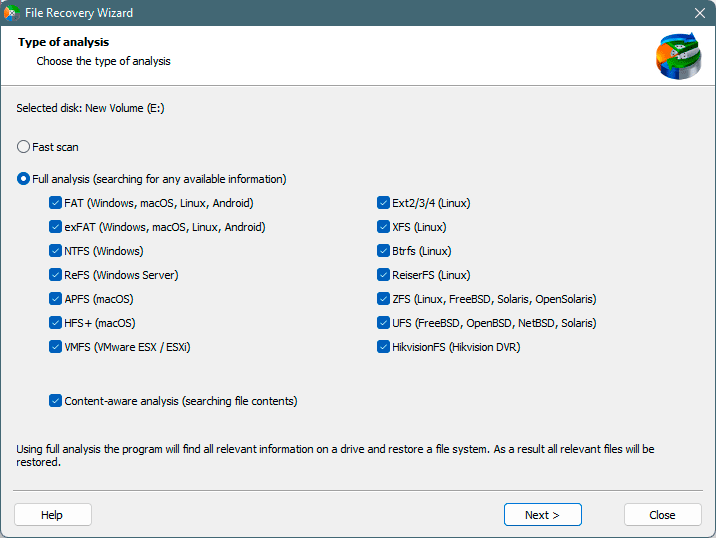
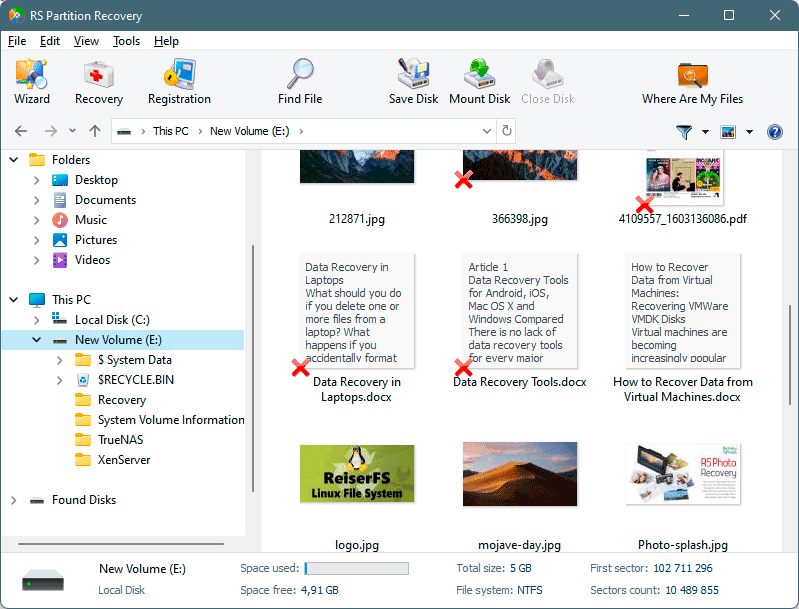
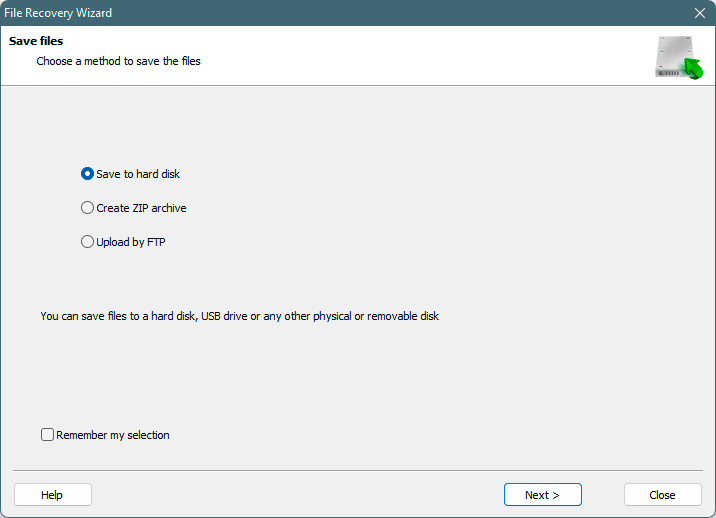
Data Recovery Process
4 simple steps to recover your lost data
RS PARTITION RECOVERY
Start Your Data Recovery Now
Download free trial and preview your recoverable files - no credit card required
✓ 30-day money-back guarantee | ✓ Free file preview | ✓ 24/7 technical support
Common File Recovery Scenarios
Real-world situations where file recovery software saves your data
1
Shift+Delete Files
Accidentally pressed Shift+Delete instead of Delete? Files bypass Recycle Bin and appear permanently lost. RS Partition Recovery scans disk sectors and recovers deleted files.
✓ Direct Sector Recovery
Finds file remnants on disk and reconstructs original files
2
Emptied Recycle Bin
Cleared Recycle Bin containing critical work documents, family photos, or project files. Standard Windows recovery not possible after emptying.
✓ Post-Deletion Recovery
Recovers files even after Recycle Bin emptying
3
Formatted USB/SD Card
Formatted USB stick or SD card in camera/phone. Photos, videos, documents appear deleted. Quick format only clears file table, data remains on device.
✓ Flash Media Recovery
Extracts files from formatted removable media
4
Corrupted Photo/Video Files
Image files corrupted after improper camera shutdown, video recording interrupted by battery death, or file system errors during transfer.
✓ File Signature Recovery
Reconstructs corrupted media files from fragments
5
Application-Deleted Files
Software bug, cleaner tool, or uninstaller deleted important files. Files removed without going to Recycle Bin. No built-in undo option available.
✓ Application Bypass Recovery
Recovers files deleted by any program
6
Ransomware Encrypted Files
Ransomware encrypted documents and photos. Attackers demand payment for decryption key. Need to recover file versions before encryption.
✓ Pre-Encryption Recovery
Finds original unencrypted file versions
Lost Partition Recovery Scenarios
When partitions are deleted, damaged, or become inaccessible
7
Diskpart Clean Command
Windows diskpart clean command wiped all partitions from disk. Partition table removed, but actual data still exists on disk sectors.
✓ Partition Table Reconstruction
Rebuilds MBR/GPT and restores all partitions
8
Deleted Partition in Disk Management
Selected wrong drive letter in Windows Disk Management and deleted partition containing important data. Partition now shows as unallocated space.
✓ Deleted Partition Recovery
Finds and restores recently deleted partitions
9
Lost Linux Partition After Update
Windows 11 update overwrote GRUB bootloader. Linux partition no longer visible in Windows. System boots only to Windows.
✓ Dual-Boot Recovery
Finds hidden ext4/Btrfs Linux partitions
10
RAW Partition Error
Drive shows "You need to format the disk" error. Partition visible but inaccessible. File system corrupted by improper shutdown or bad sectors.
✓ RAW to NTFS/FAT32 Recovery
Extracts files without formatting drive
11
Failed Partition Resize
Resize operation interrupted mid-process by power failure or system crash. Partition structure damaged, data appears lost.
✓ Incomplete Operation Recovery
Recovers data from partial resize operations
12
Virus Corrupted MBR
Virus or malware corrupted Master Boot Record. Computer won't boot, shows "Operating System Not Found". Partitions inaccessible.
✓ MBR Reconstruction
Rebuilds boot sector and partition table
Free Trial vs Full License
Try all recovery features for free - save files only in full version
| Feature | Free Trial | Full Version |
|---|---|---|
| Scan for deleted files | ✓ | ✓ |
| Find lost partitions | ✓ | ✓ |
| Preview all file types | ✓ | ✓ |
| Deep scan mode | ✓ | ✓ |
| All file systems (NTFS, FAT, ext4, APFS, etc.) | ✓ | ✓ |
| VMFS partition support | ✓ | ✓ |
| Virtual machine formats | ✓ | ✓ |
| Hex Viewer | ✓ | ✓ |
| Create disk images | ✓ | ✓ |
| Save recovered files | ✗ | ✓ |
| Network save (FTP, network drives) | ✗ | ✓ |
| Technical support | ✓ | ✓ 24/7 |
What's New?
06 July 2026
- New Features:
- Added support for encrypted BitLocker disks and volumes with password, recovery key, and BEK file unlocking. Supports AES-128-CBC + Diffuser, AES-256-CBC + Diffuser, AES-128-CBC, AES-256-CBC, AES-128-XTS, and AES-256-XTS. Available on Windows, macOS, and Linux.
- Added support for encrypted Linux LUKS1 and LUKS2 volumes with password and key file unlocking. Supports AES-XTS-plain64, AES-CBC-ESSIV:SHA256, PBKDF2, Argon2i, and Argon2id. Available on Windows, macOS, and Linux.
- Added support for encrypted VeraCrypt volumes, including standard, hidden, and system volumes. Supports password, PIM, and key file unlocking, AES, Serpent, Twofish, Camellia, and Kuznyechik encryption, and SHA-256, SHA-512, Whirlpool, BLAKE2S, STREEBOG, and Argon2 key derivation. Available on Windows, macOS, and Linux.
- Added support for encrypted forensic images, including EWF/E01, AFF, AFD, AFF4, and AFF4-directory formats. Supports password authentication for EWF/E01 and password, private key, or PFX/P12 certificate authentication for AFF, AFD, and AFF4. Available on Windows, macOS, and Linux.
- Added support for encrypted Apple Disk Images (DMG, ASIF, sparseimage, and sparsebundle). Supports password authentication, private key and PFX/P12 certificates (DMG, sparseimage, sparsebundle), and AES-128/AES-256 encryption. Available on Windows, macOS, and Linux.
- Added support for NTFS EFS-encrypted files with PFX/P12 certificate authentication and importing EFS decryption keys from Windows.
- Added support for APFS FileVault, HFS+ FileVault2/CoreStorage (password or recovery key + EncryptedRoot.plist.wipekey), and Ext2/3/4 fscrypt (policy v1/v2). Available on Windows, macOS, and Linux.
- Added support for QEMU external snapshots and compressed QCOW2 images and snapshots.
- Added SSH support for VMware ESXi servers.
- Improvements:
- Improved XFS recovery by fixing recovery of some files and significantly increasing recovery speed for large files.
- Improved VMware VMDK image compatibility.
- Improved FAT filename handling.
- Bug Fixes:
- Fixed incorrect recovery of some XFS files.
- Fixed reading issues with some VMware VMDK disk images.
- Fixed FAT filename handling issues.
- Various compatibility and stability improvements.
Frequently Asked Questions
Please use free versions of programs with which you can analyze the storage and view the files available for recovery.
You can save them after purchasing the program - you won't need to scan it again.
In most cases, the data may still remain available. Just run the data recovery software and scan the desired partition to get it back.
Yes. To work with VM, mount disks in the same way as connecting disk images. Menu: Tools - Mount Disk.
Yes, it is possible to recover deleted files if they have not been overwritten by new data.
Stop using the disk (create an image) as soon as the files have been deleted and use RS Partition Recovery to recover the deleted files.
This greatly depends on the capacity of your hard drive and your computer's performance. Basically, most of hard disk recovery operations can be performed in about 3-12 hours HDD 1TB in normal conditions.
